Language Versions (Expert Mode)
FreeXmlToolkit works with the newest standards by default: XPath 3.1, XQuery 3.1, XSLT 3.0, XML Schema 1.1
(detected from the schema), XML as each document declares it, and Schematron with the xslt2 query binding.
Many processors in production are older: Xalan and libxslt (XSLT 1.0 / XPath 1.0), databases and middleware with XPath 2.0 or XQuery 1.0, validators without XSD 1.1. If you write for such a processor, FreeXmlToolkit can work in that version: whatever the target does not have — newer syntax, newer functions, newer instructions — is reported as an error instead of silently working in FreeXmlToolkit and failing later on the target.
Turning it on
Settings → Schemas & Validation → Standards (expert mode):
- Tick Choose language versions. Off (the default), everything behaves as before and no version controls are shown.
- Choose the defaults for XPath, XQuery, XSLT, XSD, XML and Schematron.
- Save settings.
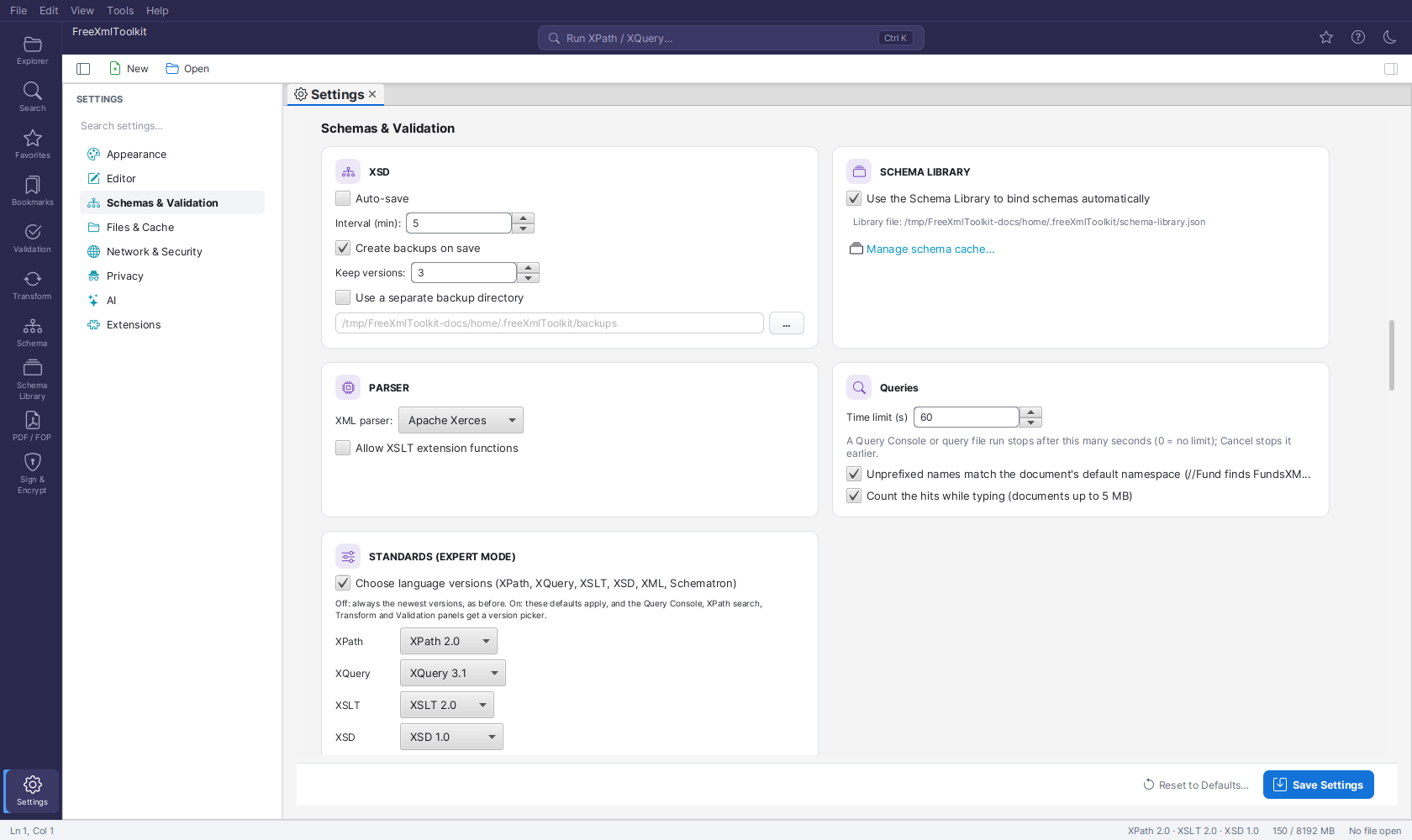
The Standards card; the status bar shows the older defaults in use (XPath 2.0 · XSLT 2.0 · XSD 1.0).
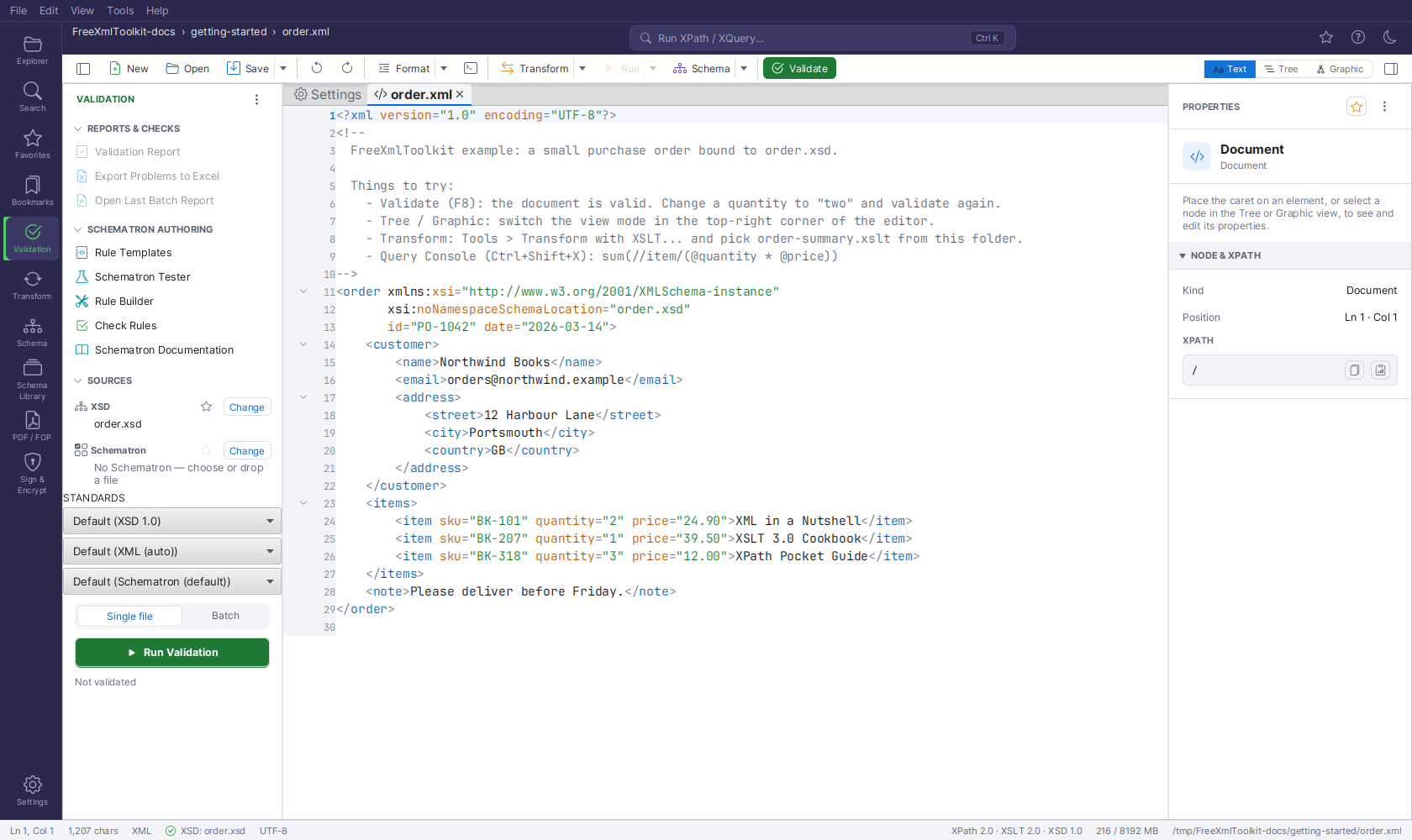
With the expert mode on, these tools get a version picker of their own. Its first entry, Default (…), uses the default from the settings (or the project's binding, see below); any other entry is remembered per tool.
| Where | Picker |
|---|---|
| Query Console | XPath or XQuery version, next to the XPath | XQuery switch |
| Search → XPath | XPath version, under the expression |
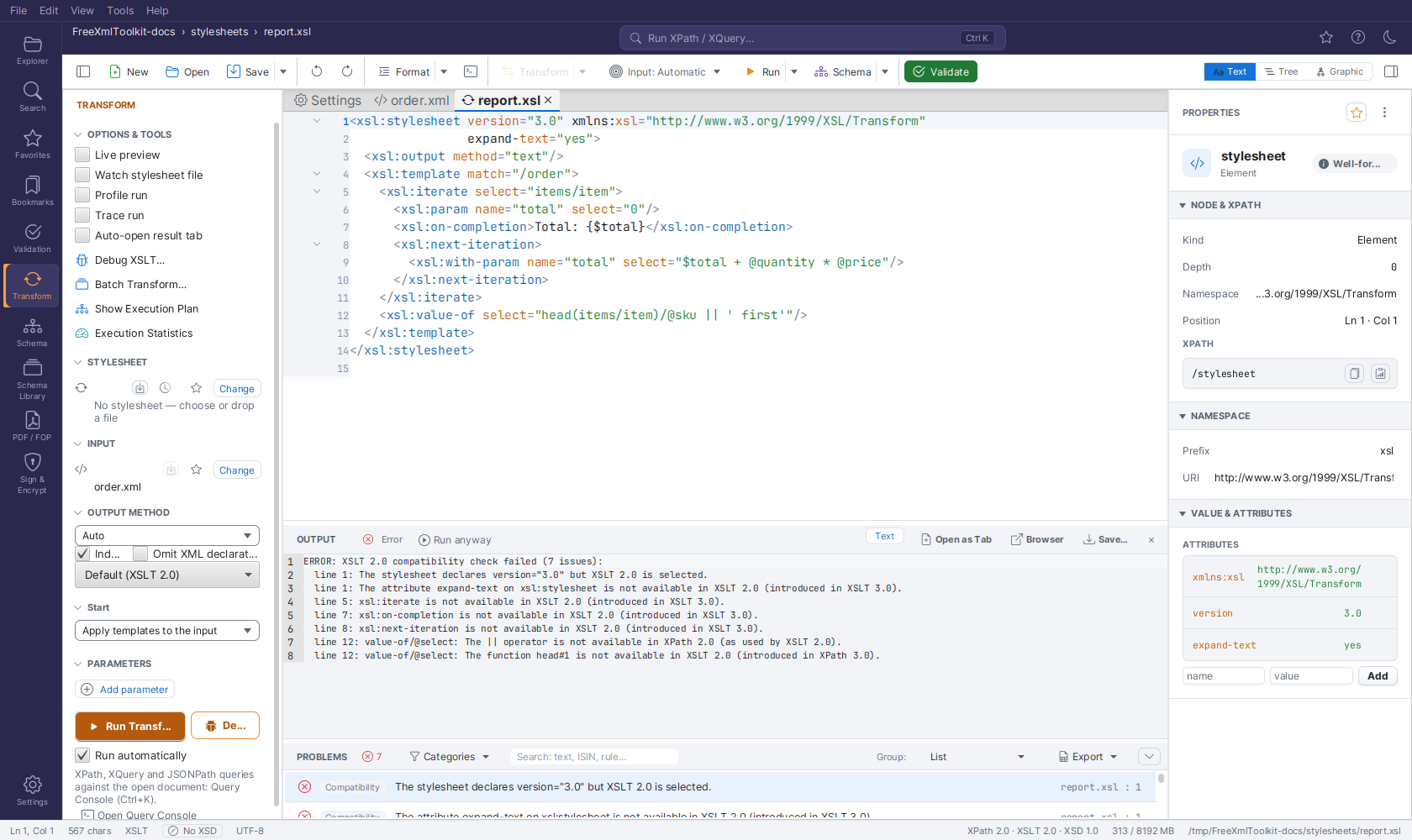
| Transform panel | XSLT version, under the output method |
| Validation panel | STANDARDS: XSD version, XML version, Schematron binding |
Running a query or stylesheet from the editor (Run ▾) uses the Query Console's and the Transform panel's choice.
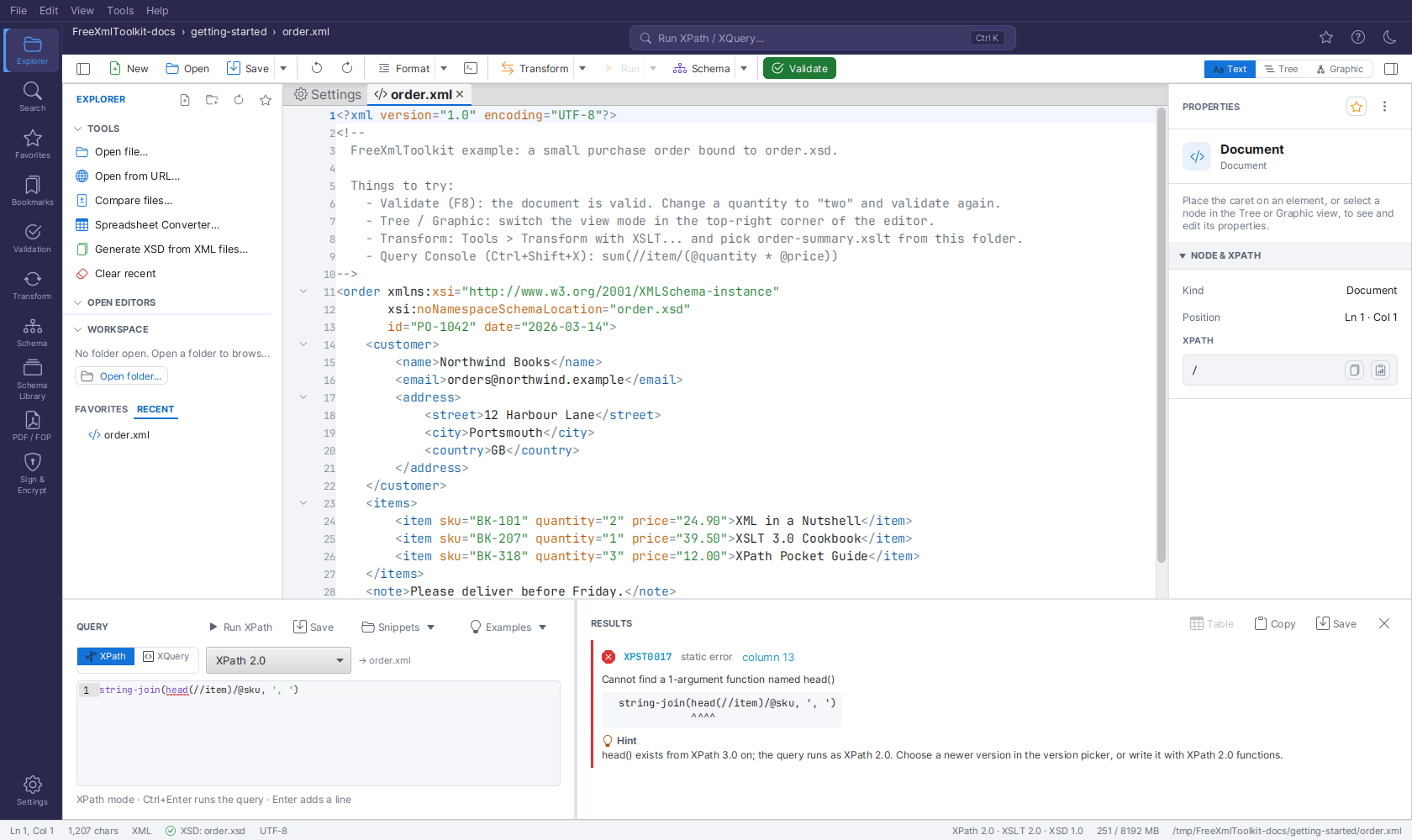
The Query Console in XPath 2.0: head() exists only from XPath 3.0 on.
Check Compatibility (Run ▾, shown in expert mode) checks the active XSLT, XQuery, XPath or Schematron document
against the chosen version without running it: XSLT against the Transform panel's version, XQuery and XPath against
the Query Console's, Schematron against the Validation panel's binding. Every construct the version does not have is
listed in the Problems panel with its line. For XSLT 1.0 the stylesheet is compiled strictly by the JDK's XSLT 1.0
processor; a stylesheet that declares version="2.0" is reported, because an XSLT 1.0 processor would run it in
forwards-compatible mode and silently skip what it does not know.
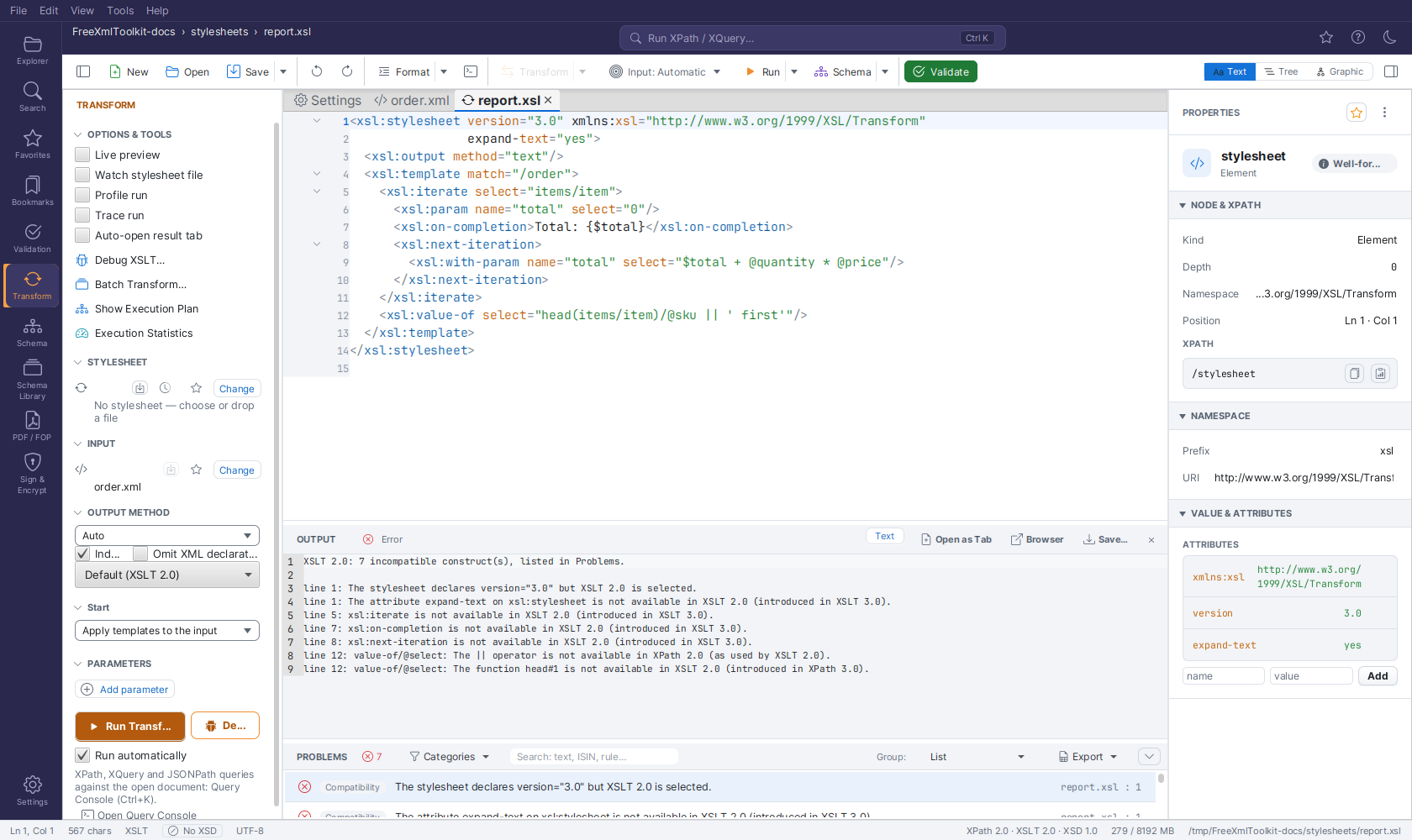
Run anyway. When the XSLT 2.0 check refuses a stylesheet in the Transform panel, the output panel lists the issues and offers Run anyway: the stylesheet runs once on the XSLT 3.0 processor without the check.
What each version means
| Choice | How it runs | What is reported |
|---|---|---|
| XPath 1.0 | The JDK's own XPath 1.0 engine | Everything that is not XPath 1.0 (for, if, sequences, XPath 2.0 functions) — results follow the 1.0 rules (1 + '2' = 3) |
| XPath 2.0 | Saxon at language level 2.0 | \|\|, !, let, =>, maps, arrays, inline functions, and every function added in 3.0 / 3.1 (head(), one-argument string-join(), serialize(), parse-json() …) |
| XPath 3.0 | Saxon at language level 3.0 | =>, maps, arrays, lookups and the 3.1 functions |
| XSLT 1.0 | The JDK's own XSLT 1.0 processor (XSLTC) | XSLT 2.0 instructions and XPath 2.0 expressions are compile errors; output follows the 1.0 rules |
| XSLT 2.0 | Checked first, then Saxon | XSLT 3.0 instructions (xsl:iterate, xsl:try, xsl:mode, xsl:map …), 3.0 attributes (expand-text, visibility, shadow attributes _name …), version="3.0", and every expression, pattern and attribute value template compiled as XPath 2.0 — also in included and imported modules |
| XQuery 1.0 / 3.0 | Checked first, then Saxon | Saxon's XQuery parser held at the older level, plus the 3.0 additions it does not catch (group by, switch, windows, count, allowing empty, annotations …), and calls of newer functions |
| XSD 1.0 / 1.1 | Xerces with the chosen XSD version | Under 1.0 a schema with assertions, alternatives, open content or vc:minVersion="1.1" is an error |
| XML 1.0 | As declared | A document declared as XML 1.1 is an error |
Schematron xslt / xslt2 / xslt3 |
The query binding of a schema without its own @queryBinding |
With xslt / xslt2 every context, test and let value must be XPath 1.0 / 2.0 |
Limits. XQuery 1.0 / 3.0 and XSLT 2.0 run on Saxon (an XSLT 3.0 / XQuery 3.1 processor) after the check; the check is thorough but not a second processor, so a construct it misses still runs. XSLT 1.0 has no profiler, trace or debugger (those need Saxon); the debugger always runs Saxon. The AI assistant and the Query Console's IntelliSense still suggest functions of every version.
Projects
A project can fix the versions per file pattern in its schemaBindings and per scenario:
"schemaBindings": [
  { "files": "legacy/**/*.xml", "schema": "schemas/old.xsd", "xsdVersion": "1.0", "xmlVersion": "1.0" },
  { "files": "**/*.xml", "schematron": "rules.sch", "schematronBinding": "xslt2" }
],
"scenarios": [
  { "name": "Invoice", "stylesheet": "xslt/invoice.xsl", "input": "${file}", "languageVersion": "1.0" }
]
Each value comes from the first matching binding that names it. Order of precedence: command-line option, the tool's own choice, the project, the default in the settings. In the application, project values apply while the expert mode is on; on the command line they always apply.
Command line and MCP server
The command line does not read the settings — a run is reproducible:
fxt-cli query --lang-version 2.0 -e 'string-join(//ISIN, ",")' fund.xml
fxt-cli transform order.xml -s invoice.xsl --lang-version 1.0
fxt-cli validate orders/ --xsd order.xsd --xsd-version 1.0 --xml-version 1.0 --schematron-binding xslt2
See Command Line. The MCP server tools take the same choices as arguments:
xpath_version, xquery_version, xslt_version, xsd_version, xml_version, schematron_binding — an agent
can write and verify code for an older processor, or produce verified examples per language version.
Administrators
The keys standards.expertMode, standards.xpath, standards.xquery, standards.xslt, standards.xsd,
standards.xml and standards.schematronBinding can be preset or locked like any other setting (see
Administration).