description: Everything FreeXmlToolkit can do: XML and JSON editing, XSD design, validation, XSLT and XQuery with debugger and profiler, PDF, signatures, compare, conversion, command line and industry plugins.
What FreeXmlToolkit can do
An overview of the application by area, with a link to the guide for each.
At a glance
FreeXmlToolkit is a free desktop application for working with XML files. It helps you edit, validate, transform, and secure your XML documents - all in one place.
 A tour of the main features - click to open it full screen
What Can You Do With FreeXmlToolkit?
- Edit XML files with smart auto-completion and syntax highlighting
- Validate XML against XSD schemas, DTDs and RELAX NG schemas to check for errors
- Validate JSON against JSON Schemas, auto-detected from the document's
$schemamember - Transform XML into other formats (HTML, PDF, Text)
- Sign and encrypt XML documents with certificates, keys or passwords
- Create business rules with Schematron validation
- Generate documentation from your XSD schemas
- Compare and merge XML files by structure, compare folders
- Convert XML ↔ JSON ↔ YAML and XML ↔ Excel / CSV
- Open huge files (gigabytes) in the Large File Viewer
- Automate with the command line (
fxt-cli) and projects - Work with AI - an optional AI assistant that checks every answer, and an MCP server for AI agents
- Extend it with plugins — the industry plugins FundsXML, ISO 20022, ebInterface, FinDatEx, XBRL, PK-Meldewesen, KAG-Meldewesen and ESMA Reporting are included
- Work in English or German, accessible, centrally administrable
Supported Standards
These are the XML-related standards and versions FreeXmlToolkit reads, validates, runs or writes:
| Area | Standard and version | Engine |
|---|---|---|
| XML | XML 1.0 (Fifth Edition), XML 1.1, Namespaces in XML, OASIS XML Catalogs 1.1 | Xerces 2.12 |
| Schemas | XSD 1.0 and 1.1 (assertions, type alternatives, open content, xs:override), DTD, RELAX NG (XML and compact syntax) |
Xerces (XSD 1.1 build), Jing, Trang |
| Business rules | ISO Schematron (query bindings xslt2 and xslt3), Schematron Quick Fixes (SQF) |
ph-schematron / SchXslt on Saxon |
| Transformation | XSLT 1.0, 2.0 and 3.0 | Saxon HE 12 (not schema-aware, no streaming) |
| Query | XPath 1.0 – 3.1, XQuery 1.0 – 3.1, JSONPath | Saxon HE 12, Jayway JsonPath |
| Pipelines and tests | XProc 3.0, XSpec 4 (XSLT, XQuery, Schematron) | XML Calabash 3, XSpec |
| XSL-FO 1.1 (as implemented by Apache FOP), PDF/A-1b; external XSL-FO processors | Apache FOP 2.12 | |
| Security | XML Signature 1.1, XML Encryption 1.1, Canonical XML 1.0 / 1.1, Exclusive XML Canonicalization 1.0 | Apache Santuario 4 |
| JSON and YAML | JSON (RFC 8259), JSON Schema Draft-07, 2019-09 and 2020-12, YAML 1.2 | networknt json-schema-validator, SnakeYAML Engine |
| AI agents | Model Context Protocol (MCP, revisions up to 2025-11-25, stdio) | MCP Java SDK |
Works On All Platforms
FreeXmlToolkit runs on Windows (x64), macOS (Apple Silicon and Intel) and Linux (x64) - as an installer, a native package or a portable ZIP, and via Scoop and Homebrew. The Installation page explains every format and the package managers.
Features by area
XML Editor
Edit your XML files with professional tools:
| Feature | What It Does |
|---|---|
| Auto-Completion | Suggests valid elements and attributes as you type |
| Syntax Highlighting | Colors your XML for easier reading |
| Instant Validation | Shows errors immediately as you edit |
| Find & Replace | Search and replace text in your documents |
| Find in Files | Search and replace across all files of a folder - by plain text or by XPath (the Search activity, Ctrl+Shift+F) |
| Code Folding | Collapse sections to focus on what matters |
| Grid View | Edit XML like a spreadsheet in the Graphic view: repeating elements as tables, opened cells, entry helpers, copy/paste with Excel |
| Properties Inspector | View and edit the selected node - and its schema declaration - in every view |
| Query Console | Run XPath 3.1, XQuery 3.1 and JSONPath against the open document (Ctrl+K); Ask AI writes the query from a question |
| Templates and Favorites | Insert prepared snippets; keep the files you use often one click away |
| Bookmarks | Mark lines, name and number them, and jump back with a shortcut - they follow your edits and are kept per file |
| Large File Viewer | Open files of several gigabytes: text, structure, statistics, validation, and editing a window of the file in the grid |
Learn more: XML Editor Guide | Grid View | Templates | Favorites | Bookmarks | Large files
JSON Editor
Edit and validate JSON files with multiple format support:
| Feature | What It Does |
|---|---|
| Multi-Format Support | Edit .json, .jsonc and .json5 files, including JSONC-style comments and JSON5 syntax |
| Tree View | Navigate JSON structure visually |
| Grid View | Edit JSON in the same grid as XML - arrays of objects as tables, type-aware inline editing, undo/redo |
| JSONPath Queries | Extract data using JSONPath expressions |
| Schema Validation | Validate against JSON Schema (Draft-07, 2019-09, 2020-12) - the schema is auto-detected from the document's $schema member, or bound manually; problems appear with line numbers |
| Hover Information | See JSONPath and type info on hover |
Learn more: JSON Editor Guide
XSD Schema Tools
Work with XML Schema files:
| Feature | What It Does |
|---|---|
| Visual Schema Viewer | See your schema as an interactive diagram |
| Documentation Generator | Create documentation from a schema as an HTML site, a Word document or a PDF; the HTML site includes the data dictionary as an Excel file |
| Schema from XML | Get a first draft of an XSD from a sample XML document |
| Sample XML Generator | Generate valid sample XML files with customizable rules |
| Profiled Generation | Control values per element, save profiles, batch generate |
| Schema Flattening | Combine multiple schema files into one standalone schema, optionally reduced for validation servers |
| Schema Analysis | Statistics, a type library with one-click removal of unused components, quality checks, identity-constraint and XPath validation - exportable as CSV, JSON, HTML, PDF or Excel |
| Schema Library & XML Catalogs | Map namespaces to schema files, register OASIS catalog.xml files, and manage the cache of downloaded schemas - documents without a schema reference bind automatically |
Learn more: XSD Tools Guide | Schema Documentation | Generate a Schema from XML | Profiled XML Generation | XSD Validation | Schema Library
XSLT Transformation
Convert XML into other formats:
| Feature | What It Does |
|---|---|
| Multi-Format Output | Generate XML, HTML, Text, or JSON |
| Live Preview | See results as you work |
| Rendered HTML Results | Open an HTML result as an editor tab showing the rendered page (Preview view) |
| Modern XSLT Support | Uses the latest XSLT 3.0 standard |
| Interactive Debugger | Debug XSLT, XQuery and Schematron: conditional breakpoints, logpoints, stepping, variables, watches, call stack and coverage |
| Multi-File Batch Processing | Batch Transform runs one XSLT stylesheet or one XQuery over many XML files, each file on its own, and saves all results to a folder |
| Profiler | See where the time of an XSLT or XQuery run goes: hot spots, call tree, flame graph, time per line |
| XSpec Tests | Run XSpec test suites for your stylesheets |
| Language Versions | Run against XSLT 1.0 / 2.0, XPath 1.0 - 3.0 or XQuery 1.0 / 3.0 instead of the latest version (expert mode) |
| External XSLT Processors | Run a transformation with Saxon HE 13, xsltproc, RaptorXML or another processor installed on your computer |
| XProc 3.0 Pipelines | Run multi-step processing pipelines (.xpl) with the built-in XML Calabash engine |
| Generate a Stylesheet with AI | Describe the output with a target sample; the AI assistant writes the XSLT, which is run and compared before you see it |
Learn more: Transform & Query | Transform Panel | Run a Transformation | Debugger | Profiler | XSpec | XProc Pipelines | External Processors | Language Versions
PDF Generation
Create professional PDF documents:
| Feature | What It Does |
|---|---|
| XSL-FO Support | Use XSL-FO stylesheets for formatting |
| High-Quality Output | Professional PDF generation |
| External Processors | Render with Antenna House, RenderX XEP or another XSL-FO processor installed on your computer |
Learn more: PDF Generation Guide
Digital Signatures and Encryption
Sign, verify, encrypt and decrypt XML documents:
| Feature | What It Does |
|---|---|
| Create Certificates | Generate your own signing certificates |
| Sign Documents | Add digital signatures to XML files |
| Verify Signatures | Check if signed documents are valid |
| Encrypt and Decrypt | W3C XML Encryption 1.1 for an element, its content, a whole document or any file - for certificates, public keys, shared keys or passwords, and for several recipients at once |
Learn more: Digital Signatures Guide | XML Encryption
Compare, Merge and Convert
| Feature | What It Does |
|---|---|
| Compare Files | Two files side by side as text, with merge arrows; XML also by structure, ignoring formatting, with ignore rules and a numeric tolerance |
| Compare Folders | See which files of two folders differ, and open each pair in the comparison |
| Three-Way Merge | Merge two versions with the version both came from; conflicts are marked like in Git |
| XML ↔ JSON ↔ YAML | Convert the open document into one of the other formats |
| XML ↔ Excel / CSV | Export XML as one row per node or one row per record, edit it in a spreadsheet, and import it again |
Learn more: Compare and Merge | Convert Formats
Projects and Automation
| Feature | What It Does |
|---|---|
| Projects | A .fxtproj file names the folders of a piece of work, binds schemas, Schematron rules and scenarios to files by pattern, and lists the catalogs |
| Scenarios | Saved transformations (XSLT, XQuery, XProc, PDF) with input, parameters and output; with an expected result a scenario is a regression check |
| Command Line | fxt-cli validates, transforms, queries, compares, merges, converts, signs, encrypts and renders PDF - for scripts and CI |
Learn more: Projects & Scenarios | Command Line | CI Recipes
Appearance
| Feature | What It Does |
|---|---|
| Light, Dark or System | Pick a theme, or follow the light or dark setting of your operating system |
| Accent Colour | Eight presets or your own colour for buttons, selection, focus and links |
| Text Size, Font and Density | Larger or smaller interface text, your own interface font, compact or roomy spacing |
| Editor Font and Syntax Colours | Font, size and line spacing of every code editor; colour schemes such as Monokai, plus your own colours |
| High Contrast | Stronger texts and borders on top of the light or the dark theme |
| Export Views | Save the XSD diagram, the grid or a flame graph as PNG, SVG or PDF, or copy it as an image |
Learn more: Settings | Exporting a Graphical View
Schematron Validation
Define custom business rules:
| Feature | What It Does |
|---|---|
| Business Rules | Validate beyond basic XML structure |
| Visual Rule Builder | Create rules without writing code |
| Detailed Reports | Get clear validation results |
| Quick Fixes (SQF) | Correct rule violations automatically with one click |
| Explain / Fix with AI | Let the AI assistant explain a validation problem or propose a fix that is checked against the schema and the rules |
Learn more: Schematron Guide | Quick Fixes
Industry Plugins (Optional)
Eight plugins for industry formats are built in and off by default. Each one adds an activity with checks, reports and helpers for its format:
| Plugin | For |
|---|---|
| FundsXML | Fund data exchange (see below) |
| ISO 20022 Payments (SEPA) | Payment messages: schemas, control sums, EPC SEPA rules |
| ebInterface | Austrian e-invoices |
| FinDatEx Templates | EMT, EET, EPT and TPT files |
| XBRL | XBRL validation with your Arelle installation |
| PK-Meldewesen | FMA reports of Austrian pension funds |
| KAG-Meldewesen | FMA reports of management companies (AIFMD, derivatives) |
| ESMA Reporting | EMIR, SFTR and MiFIR reports |
For every format, Check Identifiers Online looks up the LEIs of a document at GLEIF and its ISINs at ESMA FIRDS and OpenFIGI - only when you ask for it.
Learn more: Industry Standards | Online Identifier Lookup | Manage Extensions
FundsXML Extension (Optional)
Opt-in integration with the FundsXML industry standard for fund data exchange:
| Feature | What It Does |
|---|---|
| Automatic Downloads | Schemas, samples, rules and snippets are fetched from GitHub and kept up to date automatically |
| Sample Library | One-click access to FundsXML example documents via Favorites and the Welcome page |
| Quick-Validate | Check any open XML against the active FundsXML schema with one click in the FundsXML panel |
| Schematron Rules | Ready-made business-rule checks for FundsXML documents |
| Query Snippets | Pre-built XPath/XQuery expressions, ready to load in the Query Console |
| Data-Quality Checks | 54 checks with severity — error, warning, hint (ISIN/LEI, weights, positions vs. NAV, prices × units, dates, FX rates, master data …) with a report, also in every validation |
| Grid Formulas & Filters | Counts, sums per currency, weights and filters added to a document for the Grid view |
This feature is off by default. Enable it from Settings only if you work with FundsXML files - when you open a FundsXML document, the app offers to enable it once.
Learn more: FundsXML Extension Guide
AI Assistant and MCP Server (Optional)
Use a language model for the routine parts of XML work - with every answer checked by the application:
| Feature | What It Does |
|---|---|
| Fix or Explain a Problem | Right-click a validation problem → Fix with AI / Explain with AI; the fix is applied only by you, as one undo step |
| Ask AI for a Query | Turn a question into XPath or XQuery in the Query Console; the query is run before you see it |
| Generate a Stylesheet | Write XSLT from a target sample in the Transform panel; the stylesheet is run and its output compared |
| Model of Your Choice | A model on your computer (Ollama, LM Studio) or a provider you have an account with (OpenAI-compatible, Anthropic) - no subscription |
| Your Data, Your Choice | Data levels (schema only, structure, excerpts), a preview of every request, nothing in telemetry or logs |
| MCP Server | fxt-cli mcp gives AI agents such as Claude Code the validation, XSLT/XQuery, XSpec and schema tools - read-only, sandboxed, limited to the folders you name |
The assistant is off by default; turn it on under Settings → AI. Administrators can remove both features
(ai.allowed, ai.mcp.allowed).
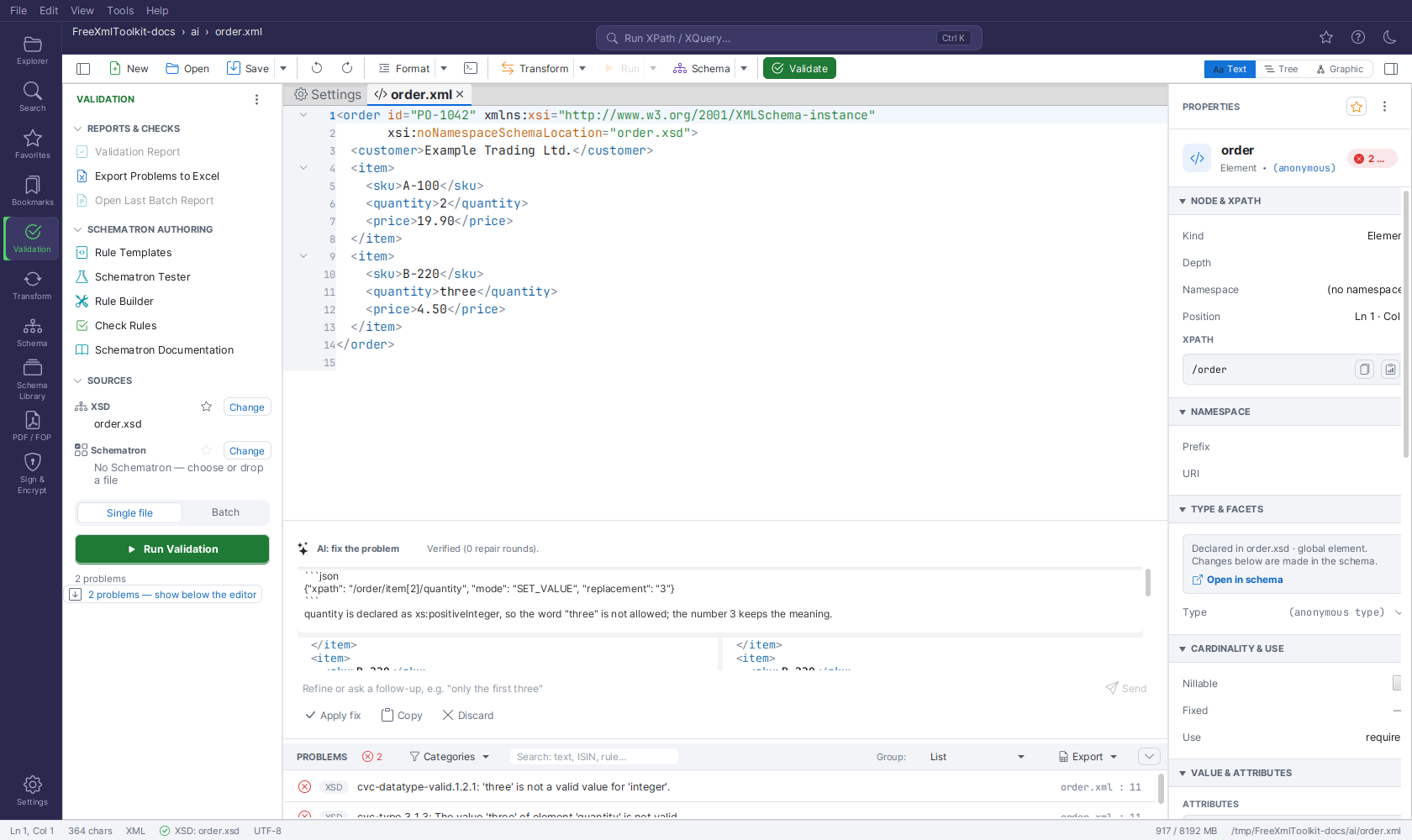
Learn more: AI Assistant | MCP Server