XProc Pipelines
XProc 3.0 is a language for XML processing pipelines: instead of running one
stylesheet at a time, a pipeline declares a chain of steps — delete, transform, validate, split,
merge — that documents flow through. Pipelines (.xpl, .xproc) are editor documents like
stylesheets and queries, and run on the embedded XML Calabash 3 engine.
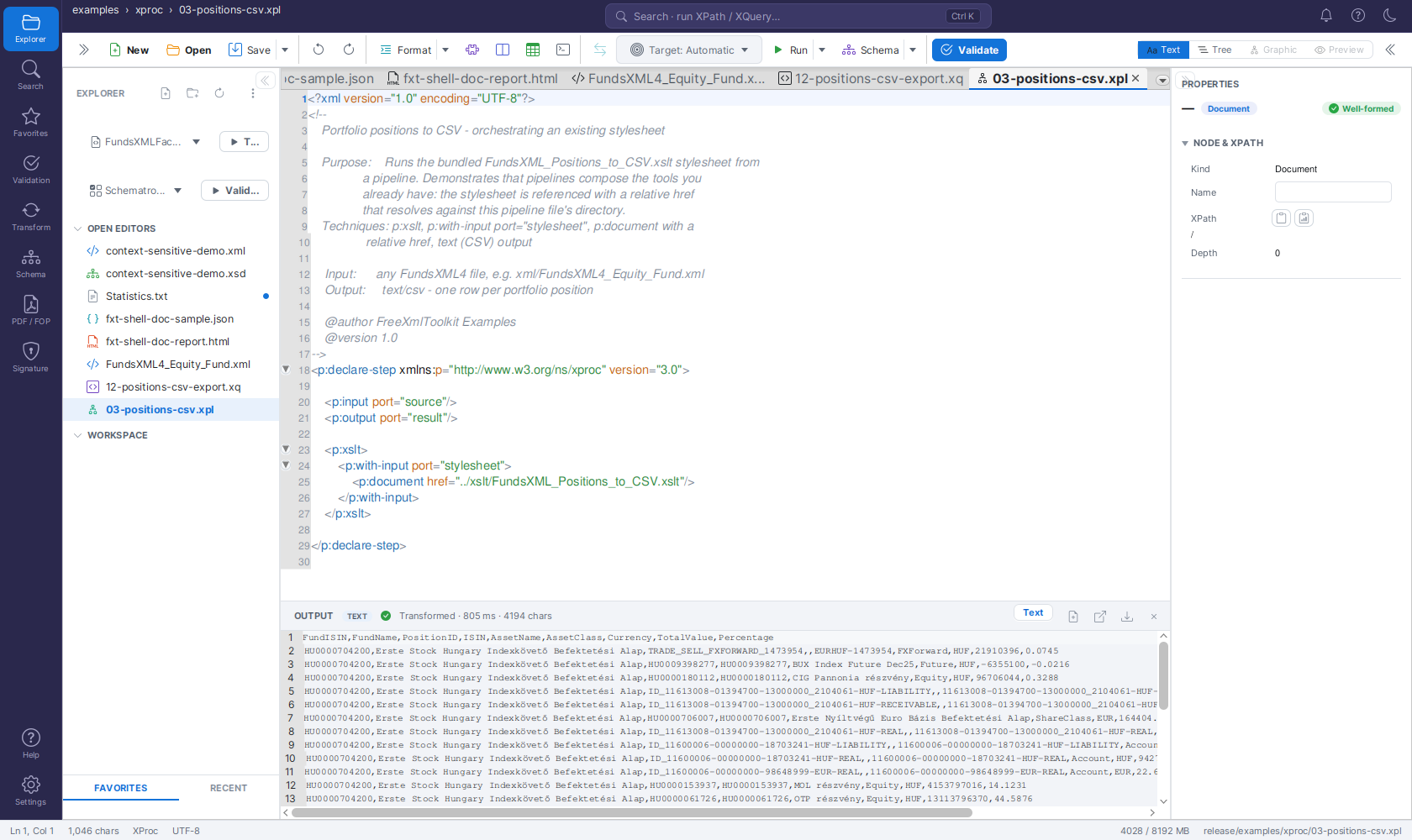 The bundled
03-positions-csv.xpl example after Run Pipeline: the pipeline runs
the CSV export stylesheet (referenced with a relative href) against the Automatic
input and shows the result in the OUTPUT panel.
Before you start
- A pipeline file. File → New…, type XProc, gives you a skeleton: a
p:declare-stepwith asourceand aresultport and onep:identitystep. - An XML document for the pipeline's input, unless the pipeline loads its documents itself.
A first pipeline
Save these two files into one folder.
orders.xml — the input:
<orders>
  <order id="1" status="open"><total>120.00</total></order>
  <order id="2" status="shipped"><total>80.50</total></order>
  <order id="3" status="open"><total>15.00</total></order>
</orders>
open-orders.xpl — the pipeline, three steps in a row:
<p:declare-step xmlns:p="http://www.w3.org/ns/xproc" version="3.0">

  <p:input port="source"/>
  <p:output port="result"/>

  <!-- 1. Drop every order that is not open -->
  <p:delete match="order[@status != 'open']"/>

  <!-- 2. Summarise what is left with an inline stylesheet -->
  <p:xslt>
    <p:with-input port="stylesheet">
      <p:inline expand-text="false">
        <xsl:stylesheet xmlns:xsl="http://www.w3.org/1999/XSL/Transform" version="3.0">
          <xsl:template match="/orders">
            <open-orders count="{count(order)}" total="{sum(order/total)}">
              <xsl:copy-of select="order"/>
            </open-orders>
          </xsl:template>
        </xsl:stylesheet>
      </p:inline>
    </p:with-input>
  </p:xslt>

  <!-- 3. Stamp the root element -->
  <p:add-attribute match="/*" attribute-name="source" attribute-value="orders.xml"/>

</p:declare-step>
Each step reads the result of the step before it; the first step reads the source port and the
last step's result goes to the result port.
Curly braces in inline content
XProc evaluates {…} inside p:inline itself, before the stylesheet ever sees it.
expand-text="false" leaves the braces to XSLT. Without it, count(order) above would be
computed by the pipeline and the result would say count="0".
Run the pipeline
- Open
orders.xmlandopen-orders.xpl, and make the pipeline the active tab. - Click Run in the editor toolbar, choose Run Pipeline in its ▾ menu, or press
Ctrl+Enter.
The pipeline runs with the text in the editor, including unsaved changes.
Which document is the input. The document on the pipeline's primary input port — the port
marked primary="true", or the only input port — is the one named in the toolbar's Input
dropdown. Automatic is the most recently active XML document; you can also pick another open
document or a file from disk, exactly as for
Run Query and Run Transform.
- A pipeline without input ports, or whose input port has a default binding (for example a
p:documentinsidep:input), runs without an input document. - A pipeline that needs an input while none is available does not run; the message asks you to open an XML document or pick one in the dropdown.
Relative addresses. hrefs in the pipeline (p:document, p:import, stylesheets of p:xslt,
Schematron schemas) resolve against the pipeline file's folder. In a pipeline that was never
saved they resolve against the application's working directory — save the pipeline first.
Read the result
The result appears in the OUTPUT panel below the editor. For the example (indented here for
reading; write <p:output port="result" serialization="map{'indent': true()}"/> in the pipeline
to get it indented):
<open-orders count="2" total="135" source="orders.xml">
  <order id="1" status="open"><total>120.00</total></order>
  <order id="3" status="open"><total>15.00</total></order>
</open-orders>
- The panel shows what arrived on the primary output port. If the pipeline declares no primary output, the first port that received documents is shown. Several documents on the port are shown one after the other.
- The view follows the result's media type: XML, HTML, JSON and text (CSV, YAML and other text formats) each open in the matching view of the panel.
- A pipeline that produces nothing shows (the pipeline produced no output documents).
- An error is shown in the same panel as
ERROR:followed by the message, with the XProc error code in brackets where the engine reports one, for example[err:XC0050].
Files that the pipeline writes itself (p:store) are written where the pipeline says.
Bundled examples
Ready-to-run pipelines are in the examples/xproc/ folder of the installation. They run against
the FundsXML files in examples/xml/, for example FundsXML4_Equity_Fund.xml.
| File | Demonstrates | Output |
|---|---|---|
01-identity.xpl |
The anatomy of a pipeline: p:declare-step, ports, p:identity |
XML (the input, unchanged) |
02-extract-fund-core.xpl |
p:delete with match patterns |
XML without positions and FX rates |
03-positions-csv.xpl |
p:xslt with a stylesheet from a relative href |
CSV, one row per position |
04-stamp-metadata.xpl |
Several steps in a row: p:add-attribute, p:insert, computed options |
XML with audit metadata |
05-for-each-shareclass.xpl |
p:for-each, inline XSLT, p:wrap-sequence |
XML share-class report |
06-choose-by-fund-type.xpl |
p:variable, p:choose / p:when |
XML with category attributes |
07-schematron-report.xpl |
p:validate-with-schematron, reading a secondary port |
SVRL validation report |
08-fund-kpis-json.xpl |
XML to JSON | JSON fund summary |
Keep the folder structure when you copy them: several reference stylesheets and schemas in the neighbouring folders. See also Bundled Example Collections.
Steps that are not available
Saxon-HE limitations
p:validate-with-xml-schema and p:xsl-formatter require Saxon-EE and are not
available; use the Validation activity (Xerces, full XSD 1.1) and the
PDF / FOP activity instead. p:validate-with-json-schema is not supported
in this bundle.
Restrictions
Pipelines are programs, so by default they run with restrictions:
- Pipelines that use
p:os-exec(run a program),p:run(run a pipeline computed at run time) orp:http-requestare not run, also when the step is in a local library the pipeline imports withp:import. The message names the step. - Documents, imports and
doc()may only be local files; loading fromhttp:,https:orftp:fails with a message that says so. - Reading and writing local files (
p:store,p:file-copy,p:file-delete, …) works as before, with your rights: run only pipelines you trust.
Settings → Network & Security → Run XProc pipelines without restrictions lifts all of it (an administrator can lock it, see Administration & Policies). It is off by default. See also the Threat Model.
On the command line
fxt-cli transform runs a pipeline; the .xpl extension selects XProc (for other extensions add
-l xproc):
fxt-cli transform -s open-orders.xpl orders.xml                 # result on standard output
fxt-cli transform -s open-orders.xpl orders.xml -o open.xml     # result into a file
fxt-cli transform -s report.xpl                                 # a pipeline that needs no input
The same restrictions apply as in the application, unless security.xproc.unrestricted=true is
set in the settings. See fxt-cli transform for all
options.
Next steps
- Run a transformation
- Projects & scenarios - save a pipeline with its input and output as a scenario
- CI recipes