XSLT and XQuery examples
Short, complete examples to copy from: XSLT 1.0 to 3.0 patterns and XQuery expressions.
What is XSLT?
XSLT (Extensible Stylesheet Language Transformations) is a language for transforming XML documents. Think of it like a recipe that tells the computer how to convert your XML data into a different format such as HTML, text, or another XML structure.
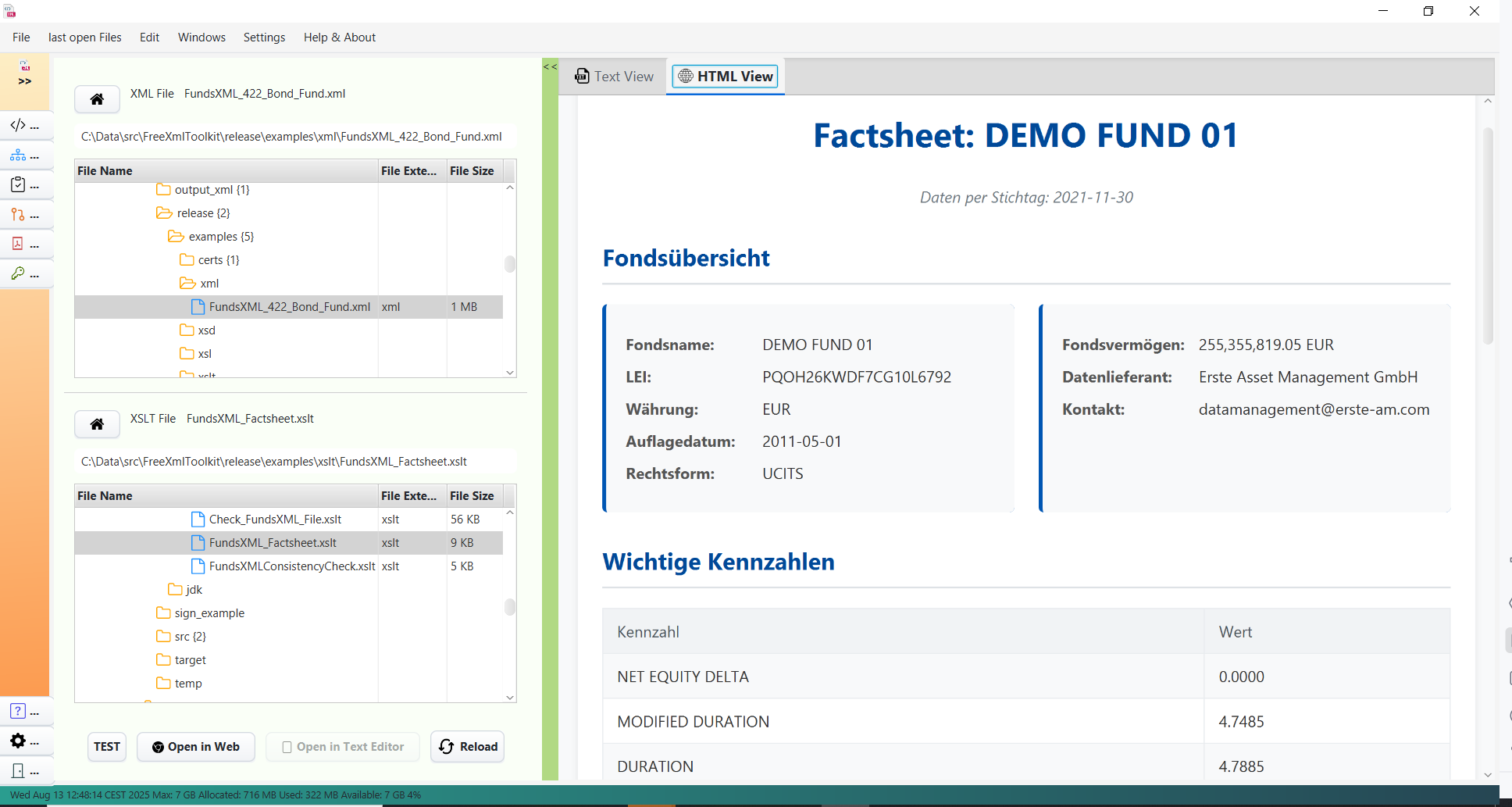 XML input + XSLT rules = Output: the
examples/xslt/FundsXML_Factsheet.xslt stylesheet
rendered as HTML in the OUTPUT panel below the editor
Common uses:
- Convert XML data to HTML for web display
- Transform XML between different schemas
- Generate reports from XML data
- Extract and restructure data
XSLT Examples
FreeXmlToolkit includes example XSLT stylesheets in the examples/ folder. Here are some common XSLT patterns:
Example 1: Basic XML to HTML
Transform a simple XML list to an HTML table:
<!-- Input XML -->
<books>
    <book>
        <title>XML for Beginners</title>
        <author>Jane Smith</author>
        <price>29.99</price>
    </book>
    <book>
        <title>Advanced XSLT</title>
        <author>John Doe</author>
        <price>49.99</price>
    </book>
</books>
<!-- XSLT Stylesheet -->
<?xml version="1.0" encoding="UTF-8"?>
<xsl:stylesheet version="1.0"
                xmlns:xsl="http://www.w3.org/1999/XSL/Transform">

  <xsl:output method="html" indent="yes"/>

  <xsl:template match="/">
    <html>
      <head><title>Book List</title></head>
      <body>
        <h1>Available Books</h1>
        <table border="1">
          <tr>
            <th>Title</th>
            <th>Author</th>
            <th>Price</th>
          </tr>
          <xsl:for-each select="books/book">
            <tr>
              <td><xsl:value-of select="title"/></td>
              <td><xsl:value-of select="author"/></td>
              <td><xsl:value-of select="price"/></td>
            </tr>
          </xsl:for-each>
        </table>
      </body>
    </html>
  </xsl:template>

</xsl:stylesheet>
Output: An HTML page with a table listing all books.
Example 2: Filter and Sort Data
Filter items based on a condition and sort the results:
<?xml version="1.0" encoding="UTF-8"?>
<xsl:stylesheet version="1.0"
                xmlns:xsl="http://www.w3.org/1999/XSL/Transform">

  <xsl:output method="xml" indent="yes"/>

  <xsl:template match="/">
    <expensive-books>
      <!-- Select books over $30, sorted by price descending -->
      <xsl:for-each select="books/book[price > 30]">
        <xsl:sort select="price" data-type="number" order="descending"/>
        <book>
          <xsl:copy-of select="title"/>
          <xsl:copy-of select="price"/>
        </book>
      </xsl:for-each>
    </expensive-books>
  </xsl:template>

</xsl:stylesheet>
Example 3: Using Templates for Modular Code
Use templates to organize complex transformations:
<?xml version="1.0" encoding="UTF-8"?>
<xsl:stylesheet version="1.0"
                xmlns:xsl="http://www.w3.org/1999/XSL/Transform">

  <xsl:output method="html" indent="yes"/>

  <!-- Main template -->
  <xsl:template match="/">
    <html>
      <body>
        <xsl:apply-templates select="books/book"/>
      </body>
    </html>
  </xsl:template>

  <!-- Template for each book -->
  <xsl:template match="book">
    <div class="book">
      <h2><xsl:value-of select="title"/></h2>
      <p>By: <xsl:value-of select="author"/></p>
      <xsl:call-template name="format-price">
        <xsl:with-param name="amount" select="price"/>
      </xsl:call-template>
    </div>
  </xsl:template>

  <!-- Named template for price formatting -->
  <xsl:template name="format-price">
    <xsl:param name="amount"/>
    <p class="price">
      <xsl:text>Price: $</xsl:text>
      <xsl:value-of select="format-number($amount, '#,##0.00')"/>
    </p>
  </xsl:template>

</xsl:stylesheet>
Example 4: XML to JSON-like Structure
Convert XML to a JSON-friendly text format:
<?xml version="1.0" encoding="UTF-8"?>
<xsl:stylesheet version="1.0"
                xmlns:xsl="http://www.w3.org/1999/XSL/Transform">

  <xsl:output method="text"/>

  <xsl:template match="/">
    <xsl:text>[</xsl:text>
    <xsl:for-each select="books/book">
      <xsl:if test="position() > 1">,</xsl:if>
      <xsl:text>{"title":"</xsl:text>
      <xsl:value-of select="title"/>
      <xsl:text>","author":"</xsl:text>
      <xsl:value-of select="author"/>
      <xsl:text>","price":</xsl:text>
      <xsl:value-of select="price"/>
      <xsl:text>}</xsl:text>
    </xsl:for-each>
    <xsl:text>]</xsl:text>
  </xsl:template>

</xsl:stylesheet>
Example 5: Conditional Formatting
Apply different styles based on data values:
<?xml version="1.0" encoding="UTF-8"?>
<xsl:stylesheet version="1.0"
xmlns:xsl="http://www.w3.org/1999/XSL/Transform">
<xsl:output method="html" indent="yes"/>
<xsl:template match="/">
<html>
<head>
<style>
.low-price { color: green; }
.high-price { color: red; font-weight: bold; }
</style>
</head>
<body>
<xsl:for-each select="books/book">
<p>
<xsl:value-of select="title"/>:
<span>
<xsl:attribute name="class">
<xsl:choose>
<xsl:when test="price < 30">low-price</xsl:when>
<xsl:otherwise>high-price</xsl:otherwise>
</xsl:choose>
</xsl:attribute>
$<xsl:value-of select="price"/>
</span>
</p>
</xsl:for-each>
</body>
</html>
</xsl:template>
</xsl:stylesheet>
Example 6: Grouping with Keys (XSLT 1.0 Muenchian Grouping)
Group items by a common value:
<?xml version="1.0" encoding="UTF-8"?>
<xsl:stylesheet version="1.0"
                xmlns:xsl="http://www.w3.org/1999/XSL/Transform">

  <xsl:output method="html" indent="yes"/>

  <!-- Key for grouping books by author -->
  <xsl:key name="books-by-author" match="book" use="author"/>

  <xsl:template match="/">
    <html>
      <body>
        <h1>Books by Author</h1>
        <!-- Select first book of each author group -->
        <xsl:for-each select="books/book[count(. | key('books-by-author', author)[1]) = 1]">
          <xsl:sort select="author"/>
          <h2><xsl:value-of select="author"/></h2>
          <ul>
            <!-- List all books by this author -->
            <xsl:for-each select="key('books-by-author', author)">
              <li><xsl:value-of select="title"/></li>
            </xsl:for-each>
          </ul>
        </xsl:for-each>
      </body>
    </html>
  </xsl:template>

</xsl:stylesheet>
XSLT 3.0 Examples
FreeXmlToolkit supports XSLT 3.0 via Saxon HE. Here are some advanced patterns:
For-Each-Group (XSLT 2.0/3.0)
Group items without the Muenchian method:
<?xml version="1.0" encoding="UTF-8"?>
<xsl:stylesheet version="3.0"
                xmlns:xsl="http://www.w3.org/1999/XSL/Transform">

  <xsl:output method="html" indent="yes"/>

  <xsl:template match="/">
    <html>
      <body>
        <h1>Books by Author</h1>
        <xsl:for-each-group select="books/book" group-by="author">
          <xsl:sort select="current-grouping-key()"/>
          <h2><xsl:value-of select="current-grouping-key()"/></h2>
          <ul>
            <xsl:for-each select="current-group()">
              <li><xsl:value-of select="title"/></li>
            </xsl:for-each>
          </ul>
        </xsl:for-each-group>
      </body>
    </html>
  </xsl:template>

</xsl:stylesheet>
Using Maps and Arrays (XSLT 3.0)
<?xml version="1.0" encoding="UTF-8"?>
<xsl:stylesheet version="3.0"
                xmlns:xsl="http://www.w3.org/1999/XSL/Transform"
                xmlns:map="http://www.w3.org/2005/xpath-functions/map">

  <xsl:output method="text"/>

  <xsl:variable name="config" select="map {
    'title': 'Report',
    'format': 'detailed',
    'max-items': 100
  }"/>

  <xsl:template match="/">
    <xsl:text>Title: </xsl:text>
    <xsl:value-of select="map:get($config, 'title')"/>
  </xsl:template>

</xsl:stylesheet>
JSON Output (XSLT 3.0)
<?xml version="1.0" encoding="UTF-8"?>
<xsl:stylesheet version="3.0"
                xmlns:xsl="http://www.w3.org/1999/XSL/Transform">

  <xsl:output method="json" indent="yes"/>

  <xsl:template match="/">
    <xsl:map>
      <xsl:map-entry key="'books'">
        <xsl:array>
          <xsl:for-each select="books/book">
            <xsl:map>
              <xsl:map-entry key="'title'" select="string(title)"/>
              <xsl:map-entry key="'author'" select="string(author)"/>
              <xsl:map-entry key="'price'" select="number(price)"/>
            </xsl:map>
          </xsl:for-each>
        </xsl:array>
      </xsl:map-entry>
    </xsl:map>
  </xsl:template>

</xsl:stylesheet>
Text Value Templates (XSLT 3.0)
<?xml version="1.0" encoding="UTF-8"?>
<xsl:stylesheet version="3.0"
                xmlns:xsl="http://www.w3.org/1999/XSL/Transform"
                expand-text="yes">

  <xsl:output method="html" indent="yes"/>

  <xsl:template match="/">
    <html>
      <body>
        <xsl:for-each select="books/book">
          <p>{title} by {author} - ${price}</p>
        </xsl:for-each>
      </body>
    </html>
  </xsl:template>

</xsl:stylesheet>
XQuery
XQuery is powerful for querying and transforming XML data. There are two ways to work with it:
- XQuery documents — open (or create) a
.xq/.xqueryfile; it gets its own editor with highlighting and autocomplete. Press the toolbar's Run button (Ctrl+Enter) to run it against the selected Input; the result appears in the OUTPUT panel. - The Query Console — switch it to XQuery mode and run a query against the active document.
Basic XQuery Example
for $book in /books/book
where $book/price > 30
order by $book/title
return <result>{$book/title}</result>
Built-in XQuery Examples
The Query Console's Examples menu inserts sample queries:
| Example | Description |
|---|---|
| Simple | Basic element selection |
| FLWOR | For-Let-Where-Order-Return |
| HTML report | Generate HTML output |
| Data-quality check | Validate data completeness |
Tip
The installation ships 17 ready-to-run XQuery scripts in examples/xquery/ and
32 XPath expressions in examples/xpath/ — open any of them and press
Ctrl+Enter. See Bundled Example Collections.
XQuery Examples
Data Extraction
(: Extract all customer emails :)
for $customer in /customers/customer
return <email>{$customer/email/text()}</email>
Transformation
(: Transform to HTML table :)
<table>
  <tr><th>Name</th><th>Email</th></tr>
  {
    for $c in /customers/customer
    return <tr>
      <td>{$c/name/text()}</td>
      <td>{$c/email/text()}</td>
    </tr>
  }
</table>
Aggregation
(: Calculate statistics :)
let $orders := /orders/order
return <stats>
  <count>{count($orders)}</count>
  <total>{sum($orders/amount)}</total>
  <average>{avg($orders/amount)}</average>
  <min>{min($orders/amount)}</min>
  <max>{max($orders/amount)}</max>
</stats>
Conditional Logic
(: Categorize items :)
for $item in /items/item
return <categorized>
  <name>{$item/name/text()}</name>
  <category>{
    if ($item/price > 100) then "Premium"
    else if ($item/price > 50) then "Standard"
    else "Budget"
  }</category>
</categorized>
Queries on the open document
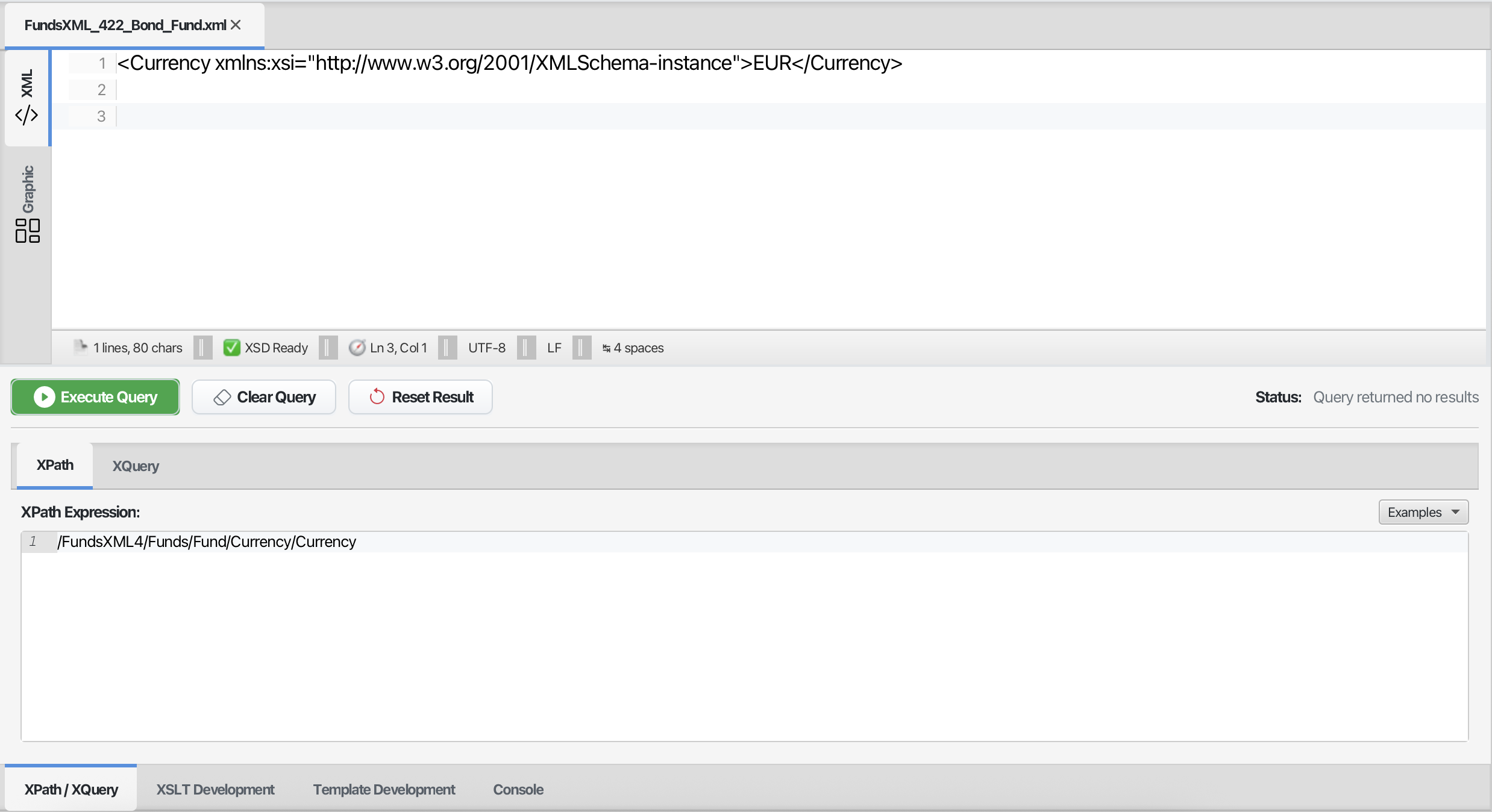 The Query Console docked below the editor - XPath query on the left, the result on the right
Use XPath and XQuery to find and extract data from your XML documents. The fastest way is the Query Console, a panel that docks along the bottom of the editor and always runs against the active document.
Using the Query Console
- Toggle the console with Ctrl+Shift+X or the toolbar's terminal icon
- Choose XPath or XQuery with the mode toggle
- Enter your expression - it is syntax-highlighted, and IntelliSense suggests element names, functions, and axes as you type (or on Ctrl+Space)
- Click Run or press Ctrl+Enter (Enter inserts a new line; the hint below the query says so)
- The result appears in the read-only results pane on the right, with syntax highlighting; Copy puts it on the clipboard
Save stores the current expression as a named snippet, and the Snippets menu loads any saved XPath or XQuery snippet back into the console. See Query Console for the full reference.
XPath Examples
| Expression | Description |
|---|---|
//element |
Find all elements named "element" |
//element/@attr |
Find all "attr" attributes on "element" |
/root/child[1] |
Find the first child of root |
count(//item) |
Count all item elements |
//text() |
Find all text nodes |
XQuery Examples
| Expression | Description |
|---|---|
for $x in //item return $x |
Return all items |
for $x in //item where $x/@id='1' return $x/name |
Filter and return |
Use the Examples menu for quick insertion of common expressions.
Bundled Example Collections
Your FreeXmlToolkit installation ships ready-to-run query
collections in the examples folder next to the application:
examples/xpath/- 32 XPath 3.1 expressions (one per file, each with a comment header). Files 01-20 cover the basics; files 21-32 are a reporting series that joins positions, asset master data and transactions and outputs CSV, ASCII tables/charts, Markdown tables or JSON.examples/xquery/- 17 XQuery 3.1 scripts. Files 01-11 are data-quality checks with HTML reports; files 12-17 are reporting/export examples (CSV export, ASCII dashboard, Markdown fund report, JSON export, pivot table, two-fund comparison).examples/xproc/- 8 XProc 3.0 pipelines, from a minimal identity pipeline to multi-step chains: slimming withp:delete, CSV/JSON export by orchestrating the bundled stylesheets, metadata stamping,p:for-eachiteration,p:choosebranching and a Schematron SVRL report. See the folder'sREADME.md.examples/xspec/- 5 XSpec test files for an XSLT stylesheet, an XQuery module and a Schematron (with the code under test next to them);05-failing-demo.xspecfails on purpose to show what a failure looks like. Open one and choose Tools → Run XSpec Tests.
All examples target the FundsXML4 sample documents in examples/xml/. The simplest way
to run one: open the file directly and press the toolbar's Run button
(Ctrl+Enter) - query, XSLT and XProc files are first-class editor documents that run
against the Input dropdown's
selection (by default the most recently active XML document). Alternatively paste a query
into the query panel or the Query Console - the
map:, array: and math: function namespaces are pre-declared, so expressions using
map:merge(), array:size() etc. run without any prolog. Each folder contains a
README.md describing every example.