XML Encryption
FreeXmlToolkit encrypts and decrypts XML according to
W3C XML Encryption 1.1: single elements, the content of
elements, whole documents or any file, for certificates, public keys, shared keys and passwords -
on the Sign & Encrypt page, from the XML editor's context menu and on the command line
(fxt-cli encrypt / fxt-cli decrypt).
Note
Encryption works on the saved file. The encrypted result is written next to it
(name.encrypted.xml) and opened; a decrypted document opens as a new, unsaved tab - it is
written to disk only when you save it.
Before you start
- A saved document; encryption works on the saved file.
- The recipient's certificate or public key, a shared key, or a password.
The Page
Open Sign & Encrypt in the activity bar. Its side panel lists the actions; three of them are about encryption:
| Action | What it does |
|---|---|
| Encrypt | Encrypts the document, the element at the editor's caret or the elements an XPath selects, for one or more recipients |
| Decrypt | Decrypts every EncryptedData your key opens - also several layers (super-encryption) |
| Inspect Encryption | Shows what is encrypted, for whom and with which algorithms - without a key |
The DOCUMENT row follows the active editor document; Browse picks another file.
In the XML editor, right-click an element → Encrypt Element… opens Encrypt with that element as
target; Decrypt… (shown when the document contains EncryptedData) opens Decrypt.
Encrypt
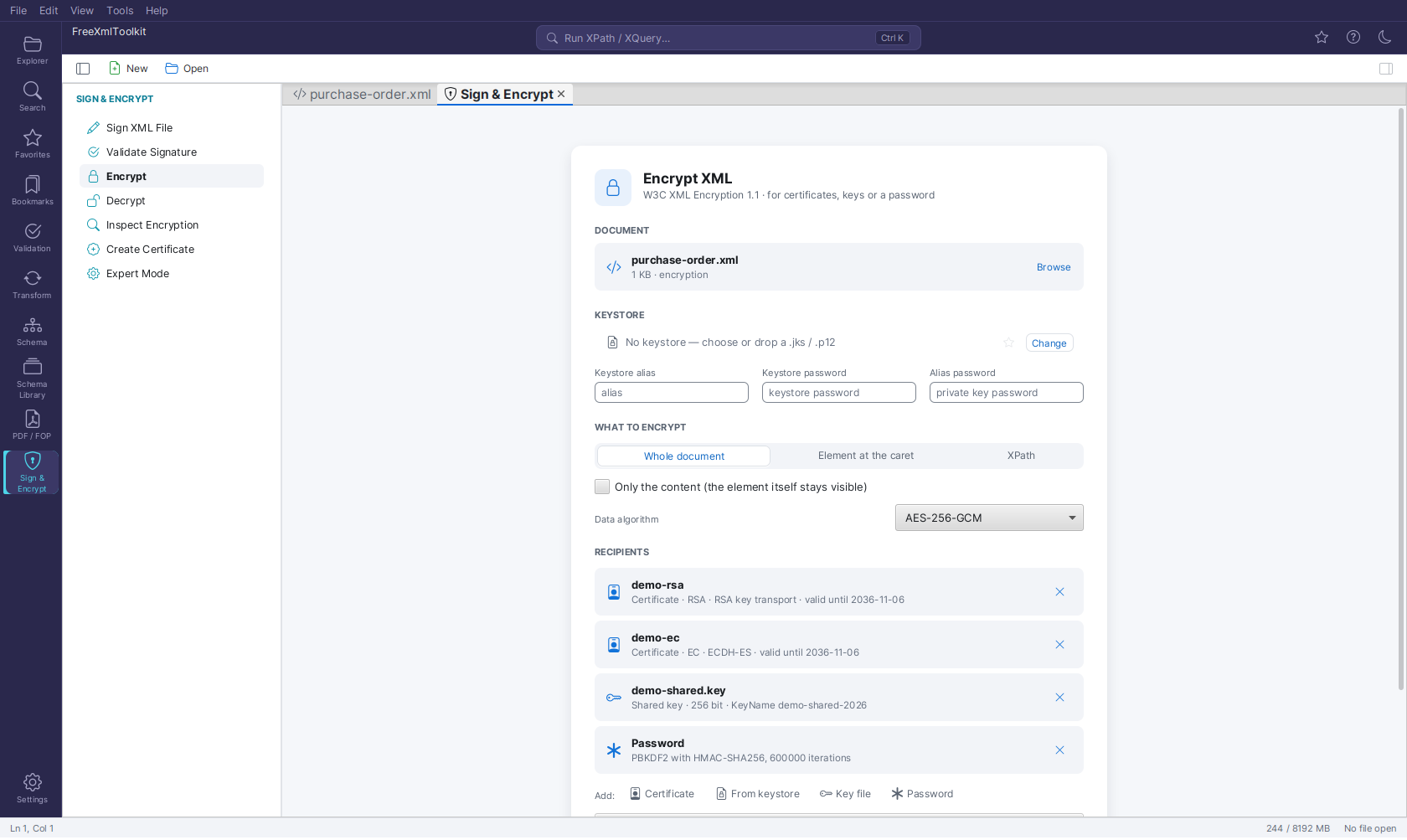 Encrypting a whole document for two certificates, a shared key and a password
- What to encrypt
- Whole document - the document element with everything in it.
- Element at the caret - the element the editor's caret was in.
- XPath - every element an XPath 1.0 expression selects. Namespace prefixes declared on the
document element can be used;
//*[local-name()='card']works without any. - Only the content - the element's children are encrypted, the element itself (with its
attributes) stays visible (
Type=…#Content).
- Data algorithm - the block cipher of the data. AES-256-GCM is the default and the recommendation; see the algorithm table.
- Recipients - who can decrypt. Every recipient gets its own
EncryptedKeywith the same data key, so each of them opens the document alone. Add them with the buttons after Add:- Certificate - a recipient's certificate or public key (PEM or DER). RSA keys use RSA-OAEP, EC keys ECDH-ES, X25519/X448 keys their key agreement.
- From keystore - the certificate of the alias in the KEYSTORE section above.
- Key file - a shared symmetric key (16, 24 or 32 bytes as hex, Base64 or raw). You can give it a KeyName so the receiver knows which key to take.
- Password - the key is derived from a password with PBKDF2 (600,000 iterations, HMAC-SHA256).
- Encrypt. The status line says how many elements were encrypted; legacy algorithms add a warning.
Advanced options
| Option | Meaning |
|---|---|
| RSA key transport | RSA-OAEP 1.1 (default), RSA-OAEP MGF1P, RSA PKCS#1 v1.5 (legacy) |
| OAEP digest / OAEP mask | Digest (SHA-1 … SHA-512) and mask generation function (MGF1 with SHA-1 … SHA-512) of RSA-OAEP 1.1 |
| Key derivation (EC keys) | ConcatKDF (default) or HKDF after ECDH-ES / X25519 / X448, and its digest |
| Key wrap | The key wrap for shared keys, passwords and key agreement (default: AES matching the data key); none uses the key file itself as data key (one recipient only) |
| Certificate reference | How an EncryptedKey names the recipient's certificate: issuer and serial number (default), the whole certificate, subject key identifier, subject name or nothing |
| Recipient attribute | A name written into every EncryptedKey (Recipient="…") |
| EncryptedKeys next to the data | The EncryptedKeys are written beside the EncryptedData with a ReferenceList, the EncryptedData points at them with RetrievalMethod |
| Encryption properties | Free name=value pairs, written as EncryptionProperties |
Decrypt
Choose the key:
| Key source | What to give |
|---|---|
| Keystore | The KEYSTORE section above: a .jks / .p12 file, the alias (or none if the keystore holds one key) and the passwords |
| Private key (PEM) | Your private key as PEM (PKCS#8 or traditional, also encrypted - then its password) |
| Key file | The shared symmetric key; optionally the KeyName it stands for |
| Password | The document's password |
Decrypt replaces every EncryptedData the key opens - outer layers first, so super-encrypted content opens too - and removes EncryptedKeys that pointed at it from outside. The result opens as a new tab. A document that is a single EncryptedData of non-XML data (a file encrypted as binary) is decrypted to its original bytes, which you save where you like.
CipherReference (cipher data in a separate file) is supported for files next to the document;
other locations are refused.
Inspect Encryption
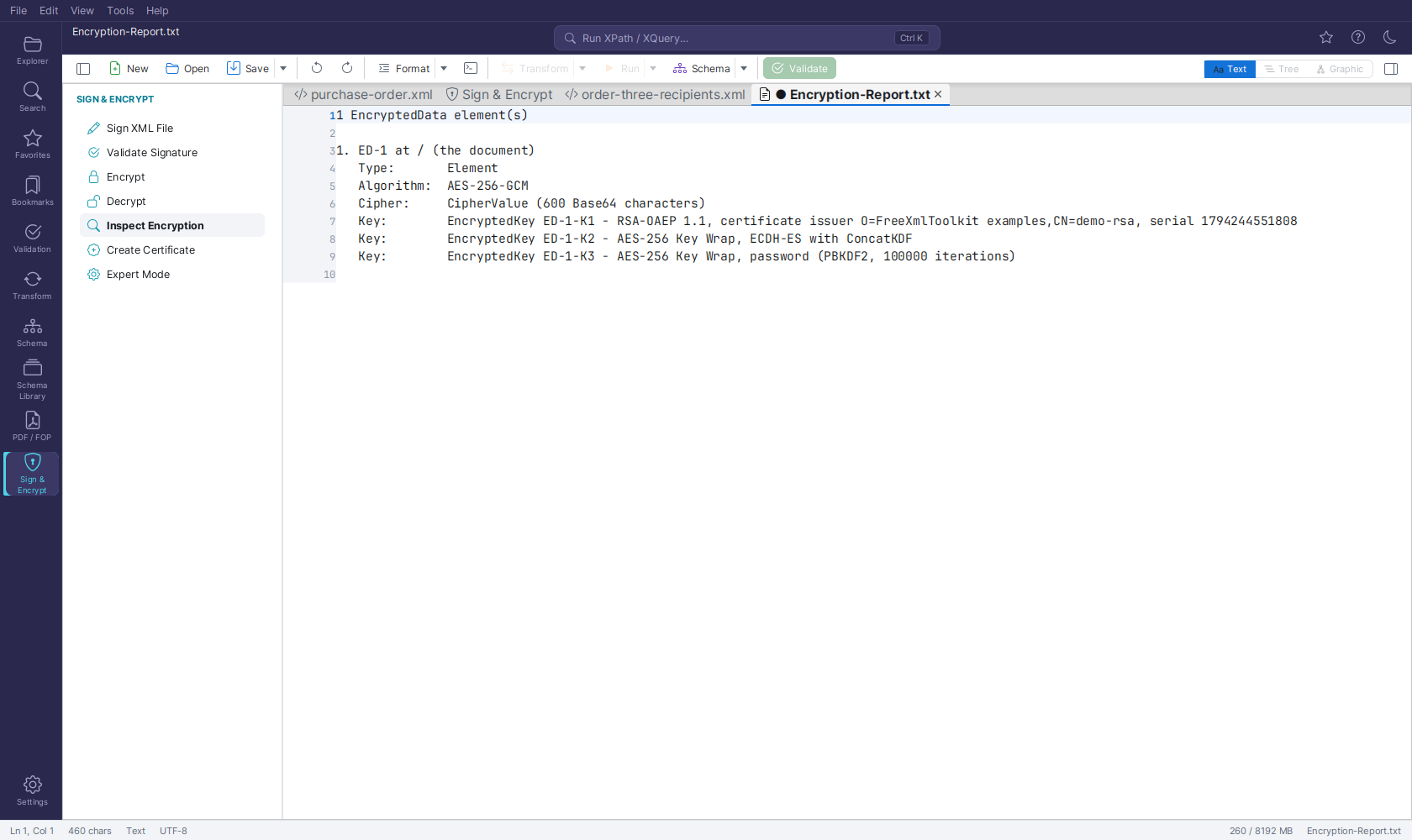 The report of an encrypted file: what is encrypted, with which algorithm, and for whom
Lists every EncryptedData with its location, type, algorithm, cipher data and the ways to its key: EncryptedKeys with method and recipient, KeyName, certificate reference (issuer and serial, subject, SKI), key agreement and derivation, password parameters - plus warnings for legacy algorithms. No key is needed.
Algorithms
| Kind | Algorithms | Legacy |
|---|---|---|
| Data | AES-128/192/256-GCM, AES-128/192/256-CBC, Camellia-128/192/256-CBC, SEED-128-CBC, TripleDES-CBC | all CBC modes, TripleDES |
| Key transport (RSA) | RSA-OAEP 1.1 (xmlenc11#rsa-oaep, digest and MGF selectable), RSA-OAEP MGF1P, RSA-1_5 |
RSA-1_5 |
| Key wrap | AES-128/192/256 KW, Camellia KW, SEED KW, TripleDES KW | Camellia, SEED, TripleDES |
| Key agreement | ECDH-ES, X25519, X448 | finite-field Diffie-Hellman (decryption only) |
| Key derivation | ConcatKDF, HKDF, PBKDF2 (passwords) | – |
Legacy algorithms are there for old partners: CBC block ciphers have no integrity protection (padding oracles), RSA-1_5 is open to Bleichenbacher attacks, TripleDES has a 64-bit block. They work, but every use shows a warning, and an administrator can switch them off (below). For new data use AES-GCM with RSA-OAEP or ECDH-ES.
The full list with URIs: fxt-cli encrypt --list-algorithms.
Sign and Encrypt
Signing and encrypting are two steps on the same page:
- Encrypt, then sign - sign the encrypted file: the signature covers the encrypted form, anyone can check it without decrypting.
- Sign, then encrypt - encrypt the signed file: the receiver decrypts first, then verifies.
The Decryption Transform for XML Signature (signatures that exclude later-encrypted parts) is not supported: decrypt first, then verify.
Command Line
# the card elements for a partner's certificate
fxt-cli encrypt order.xml -x '//p:card' --ns p=urn:pay --cert partner.pem
# the whole document for two certificates and a password from an environment variable
fxt-cli encrypt report.xml --cert alice.cer --cert bob-ec.pem --password-env REPORT_PW -o report.enc.xml
# decrypt with a keystore, a PEM key, a shared key or a password
fxt-cli decrypt order.encrypted.xml --keystore me.p12 --storepass-env KS_PW -o order.xml
fxt-cli decrypt report.enc.xml --password            # prompts
# what is encrypted - no key
fxt-cli decrypt --inspect -f json order.encrypted.xml
All options: Command Line → encrypt / decrypt.
Security
- Encrypted documents are read without any DOCTYPE, external entities or network access; Santuario runs with secure validation.
- At most 10,000 EncryptedData elements, 64 EncryptedKeys per EncryptedData and 10 million PBKDF2 iterations are accepted; a CipherReference may only name a file next to the document (up to 512 MB).
- Passwords are never written to logs or telemetry; the telemetry counts encryptions with the algorithm families, the number of recipients and whether a legacy algorithm was used.
- Administrators can disable XML encryption (
xmlenc.allowed=false) or the legacy algorithms (xmlenc.legacyAlgorithms.allowed=false), see Administration.
Examples
release/examples/encryption/ (in the installation's examples folder) holds an order encrypted
in every variant, demo keys and their passwords - see its README.md.