External XSLT processors
Instead of the bundled Saxon HE a transformation can run on any XSLT processor with a command line: a newer Saxon HE (13.1, see below), Saxon PE/EE (the licensed editions - schema-aware processing, extension functions, higher-order functions in older versions), xsltproc (libxslt, XSLT 1.0), Altova RaptorXML, or a script of your own - for example to check that a stylesheet gives the same result on the processor your production system uses.
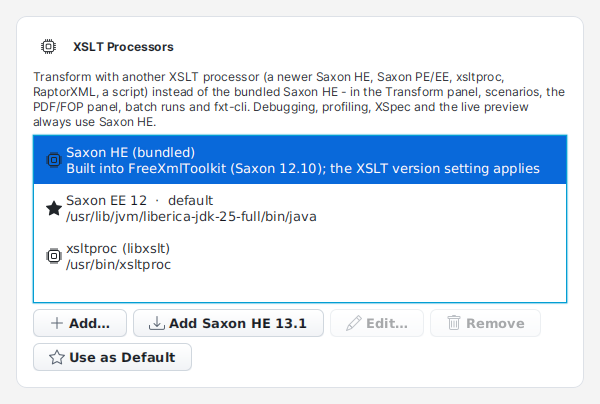
Set one up: Settings → Extensions → XSLT Processors (or the gear button next to Processor) → Add…
Before you start
- The external program installed on this computer; Saxon HE 13 can be downloaded from the settings (see below).
- Administrators can switch external processors off.
Saxon HE 13
The bundled Saxon HE is version 12.10: XML Calabash, the XProc engine, is built against it, and two Saxon versions cannot run inside one application. Add Saxon HE 13.1 on the same settings card gives you the newest Saxon HE (XSLT 4.0 / XPath 4.0 preview features, current fixes) next to it:
- After a confirmation about 6.4 MB are downloaded from Maven Central (
repo1.maven.org; the proxy settings apply), checked against fixed SHA-256 checksums and stored in~/.freeXmlToolkit/saxon/13.1/. - A processor Saxon HE 13.1 is added. It runs in a process of its own with FreeXmlToolkit's Java runtime - nothing else needs to be installed.
- Choose it in the Transform panel's Processor box, in a scenario, or make it the default.
The rest of the application - debugger, profiler, live preview, XSpec, XProc, Schematron and the AI tools - keeps using the bundled Saxon HE 12.10. The list shows which version is bundled. Nothing is downloaded until you click the button; when the administrator turns external processors off, the button is disabled too.
| Field | Meaning |
|---|---|
| Preset | Fills arguments and parameter syntax for Saxon PE/EE, xsltproc, RaptorXML or Custom |
| Name | Shown in the panels; also used by scenarios and fxt-cli transform --processor |
| Program | The executable or script. Empty: the preset's program is looked up on the PATH (Find on PATH); the Saxon presets use FreeXmlToolkit's own java first |
| Arguments | The argument template (below) |
| Parameters | How one stylesheet parameter is passed (below) |
| Working folder | Where the program runs. Empty: the stylesheet's folder |
| Time limit | The program is stopped after this many seconds (default 300) |
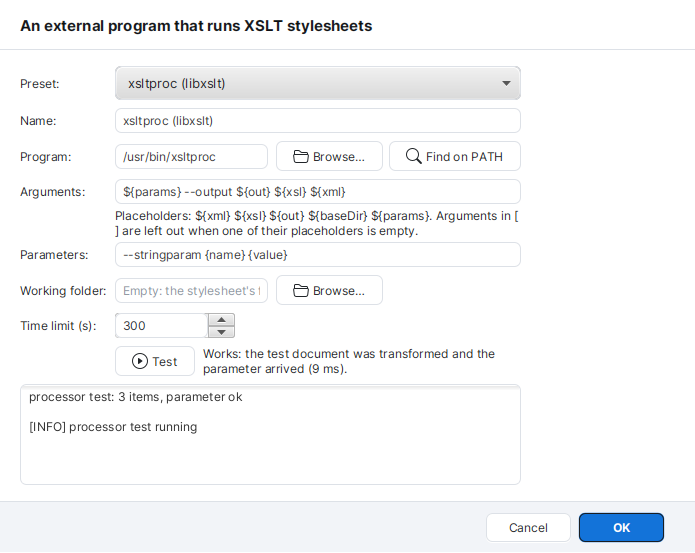
Test transforms a small document with one parameter and says whether the transformation worked and the parameter arrived. Use as Default makes a processor the default for scenarios, the PDF/FOP panel and the command line.
Argument template - arguments are separated by spaces, an argument with spaces goes in double quotes, the
program is started directly (never through a shell), [ … ] is an optional group as for the
XSL-FO processors:
| Placeholder | Value |
|---|---|
${xsl} |
The stylesheet (required) |
${out} |
The result file to write (required) |
${xml} |
The input document |
${baseDir} |
The stylesheet's folder |
${params} |
The stylesheet parameters, each written with the parameter template - several arguments |
Parameter template - repeated for every parameter: {name} and {value} are replaced, e.g.
--stringparam {name} {value} gives three arguments per parameter.
| Preset | Program | Arguments | Parameters |
|---|---|---|---|
| Saxon HE 13.1 (Java) | java |
-cp "<the downloaded jars>" net.sf.saxon.Transform -s:${xml} -xsl:${xsl} -o:${out} ${params} |
{name}={value} |
| Saxon PE/EE (Java) | java |
-cp "saxon-pe-12.jar" net.sf.saxon.Transform -s:${xml} -xsl:${xsl} -o:${out} ${params} |
{name}={value} |
| xsltproc (libxslt) | xsltproc |
${params} --output ${out} ${xsl} ${xml} |
--stringparam {name} {value} |
| Altova RaptorXML | raptorxml |
xslt --input=${xml} --output=${out} ${params} ${xsl} |
--param={name}:'{value}' |
For Saxon replace saxon-pe-12.jar with the path of your jar (the licence file goes next to it).
How a run works: the stylesheet and input text you have in the editor - saved or not - are written to hidden
temporary files next to the originals (.fxt-xslt-…, deleted afterwards), so relative xsl:include,
xsl:import and document() references resolve as they do for the files. The program runs in the working
folder; it succeeded when it exits with code 0 and wrote the result. Its console output becomes the run's
messages (xsl:message); for an error the first line, error code and phase are read from the output of Saxon,
xsltproc and RaptorXML, so the error shows its line as with Saxon HE.
What stays on Saxon HE: the live preview, Profile, Trace, the debugger, XSpec, XProc and the AI tools need Saxon's internals; with an external processor chosen, Profile and Trace are off and the XSLT version setting does not apply (the program has its own).
Where it applies: the Transform panel and the editor's Run Transform, scenarios (field
xsltProcessor), the batch transform, the XSLT stage of the PDF/FOP panel and the command
line (fxt-cli transform --processor, fxt-cli fop --xslt-processor). An administrator can turn external
processors off with xslt.external.allowed=false - see Administration.