Test with XSpec
XSpec is a unit-test framework for XSLT, XQuery and Schematron.
An .xspec file describes scenarios — an input, a function call or a context node — and what the
code under test must return. XSpec 4 is bundled and runs on the built-in Saxon HE; nothing else
needs to be installed.
Before you start
- The code to test: an XSLT stylesheet, an XQuery library module or a Schematron file.
- A saved
.xspecfile. The code under test is found relative to it, so a file that was never saved cannot run.
A first test
Put these two files into one folder.
price.xsl — the stylesheet under test, with one function and one template rule:
<xsl:stylesheet version="3.0"
                xmlns:xsl="http://www.w3.org/1999/XSL/Transform"
                xmlns:xs="http://www.w3.org/2001/XMLSchema"
                xmlns:f="urn:example:price"
                exclude-result-prefixes="xs f">

  <!-- Net price of a gross price that includes 20 % tax -->
  <xsl:function name="f:net" as="xs:decimal">
    <xsl:param name="gross" as="xs:decimal"/>
    <xsl:sequence select="round($gross div 1.2, 2)"/>
  </xsl:function>

  <xsl:template match="item">
    <line net="{f:net(@price)}">
      <xsl:value-of select="upper-case(@name)"/>
    </line>
  </xsl:template>

</xsl:stylesheet>
price.xspec — the tests:
<x:description xmlns:x="http://www.jenitennison.com/xslt/xspec"
               xmlns:f="urn:example:price"
               stylesheet="price.xsl">

  <x:scenario label="f:net with a gross price of 120">
    <x:call function="f:net">
      <x:param select="120"/>
    </x:call>
    <x:expect label="returns 100" select="100.0"/>
  </x:scenario>

  <x:scenario label="an item">
    <x:context>
      <item name="pen" price="2.40"/>
    </x:context>
    <x:expect label="becomes a line with the net price and the name in upper case">
      <line net="2">PEN</line>
    </x:expect>
  </x:scenario>

  <x:scenario label="rounding" pending="not decided yet">
    <x:call function="f:net">
      <x:param select="0.01"/>
    </x:call>
    <x:expect label="returns 0.01" select="0.01"/>
  </x:scenario>

</x:description>
What the parts mean:
| Element | Meaning |
|---|---|
x:description stylesheet="…" |
The stylesheet under test, relative to the .xspec file |
x:scenario label="…" |
One situation; scenarios can be nested, their labels are joined in the result |
x:call function="…" with x:param |
Calls a function; the parameters are passed in order |
x:context |
A node the template rules are applied to — inline, or from a file with href="…" |
x:expect select="…" |
The result must equal this XPath value |
x:expect with content |
The result must equal this XML |
pending="…" |
The scenario is listed, but not run |
Run the tests
- Open
price.xspec. - Choose Tools → Run XSpec Tests.
The tests run with the text in the editor, including unsaved changes. The stylesheet, query or Schematron under test is read from disk — save it before you run. If the active document is not a saved XSpec file, a message says so and nothing runs.
To start a new test file, choose File → New…, type XML, and one of the templates
XSpec test (XSLT), XSpec test (XQuery) or XSpec test (Schematron). Save it as
name.xspec next to the code it tests.
Read the result
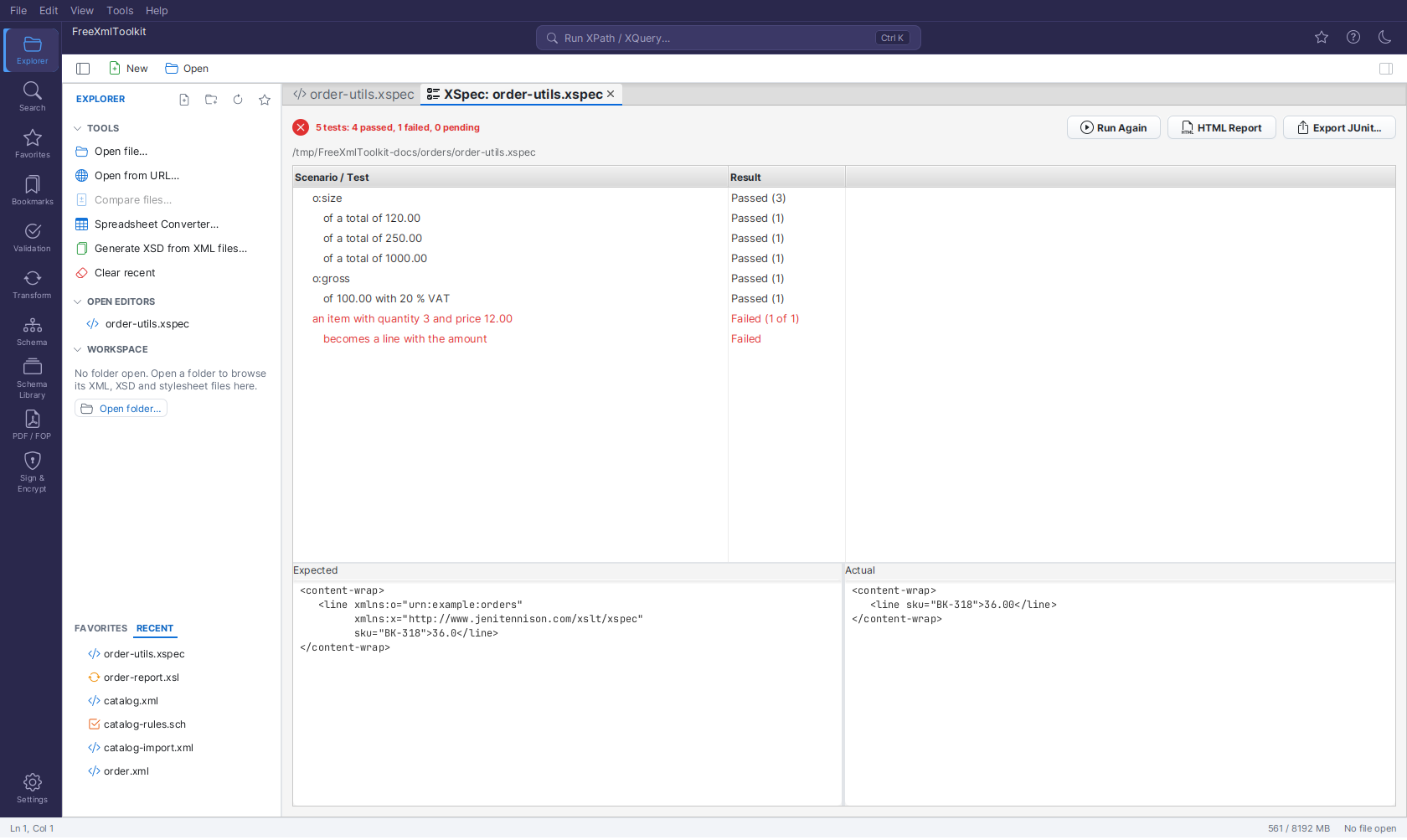 Five tests, one failed: the expected and the actual result of the failed expectation are shown below
The result opens in a tab named XSpec: price.xspec. Running the same file again reuses its tab.
- The summary at the top reads, for the example, 3 tests: 2 passed, 0 failed, 1 pending,
with a green check mark when no test failed and a red cross otherwise. If the tests could not
run at all — the
.xspecfile or the code under test does not compile — it reads The tests did not run: followed by the error. - The line below shows the path of the
.xspecfile. - The table lists every scenario with its tests in the columns Scenario / Test and Result. A test shows Passed, Failed or Pending; a scenario shows the count, for example Passed (2) or Failed (1 of 3). Scenarios with a failed test are expanded and the first failure is selected.
- Expected and Actual below the table show, for the selected test, what the test expected
and what the code returned. For an
x:expectwith only a booleantest="…", Expected is empty.
The buttons at the top right:
| Button | What it does |
|---|---|
| Run Again | Runs the tests again with the current editor text of the .xspec file — after you changed the tests or saved a change to the stylesheet. If the file is no longer open, it is read from disk. |
| HTML Report | Opens XSpec's own HTML report as a new document in the Preview view |
| Export JUnit… | Writes a JUnit XML report (suggested name price-junit.xml) for CI servers |
To see a failure, change select="100.0" to select="99" in the first scenario and click
Run Again: the scenario turns red, Expected shows 99, Actual shows 100.0.
Test XQuery and Schematron
What is tested follows the attributes of x:description:
| Attributes | Tests | Notes |
|---|---|---|
stylesheet="price.xsl" |
an XSLT stylesheet | functions, named templates, template rules |
query="urn:my-module" with query-at="lib.xqm" |
an XQuery library module | query is the module's namespace, query-at its file; scenarios use x:call function |
schematron="rules.sch" |
a Schematron file | scenarios give an x:context and use x:expect-assert, x:expect-not-assert, x:expect-report, x:expect-valid |
Ready-to-run examples of all three are in the examples/xspec/ folder of the installation:
| File | Tests | Result |
|---|---|---|
01-xslt-functions.xspec |
functions of fund-utils.xsl |
11 passed |
02-xslt-templates.xspec |
template rules of fund-utils.xsl, contexts from a file, a pending scenario |
6 passed, 1 pending |
03-xquery-module.xspec |
the XQuery module fund-queries.xqm |
5 passed |
04-schematron.xspec |
the Schematron fund-rules.sch |
8 passed |
05-failing-demo.xspec |
fails on purpose, to show Expected and Actual | 1 passed, 2 failed |
The examples read ../xml/FundsXML4_Equity_Fund.xml; keep the folder structure when you copy them.
Restrictions
- Tests always run on the bundled Saxon HE, also when an external XSLT processor is the default for transformations.
- As in every transformation, the tested code cannot load documents from the network:
doc(),document()andunparsed-text()refusehttp,httpsandftpaddresses that the Schema Library does not map to a local file. - There is no code-coverage report.
On the command line
fxt-cli xspec price.xspec                         # every test and the summary
fxt-cli xspec tests/*.xspec                       # several files
fxt-cli xspec price.xspec -r junit.xml            # JUnit XML report
fxt-cli xspec price.xspec -f html -r report.html  # XSpec's HTML report
For the example the output ends with:
passed   f:net with a gross price of 120 / returns 100
passed   an item / becomes a line with the net price and the name in upper case
pending  rounding / returns 0.01
price.xspec: 3 tests: 2 passed, 0 failed, 1 pending
A failed test is printed with its expected and actual result. The exit code is 0 when all tests
pass, 1 when a test fails and 3 when the tests cannot run. --report takes a single XSpec file.
See fxt-cli xspec for all options.
Next steps
- Debugger - step through the stylesheet when a test fails
- CI recipes - run the tests on every push
- MCP server - AI agents can run XSpec tests with the
xspec_runtool