Online Identifier Lookup (GLEIF, ESMA FIRDS, OpenFIGI)
Check digits only say that an identifier is well-formed. Whether it exists and what it stands for is known online:
- LEIs at the Global Legal Entity Identifier Foundation (GLEIF,
api.gleif.org): legal name, address, registration and entity status; - ISINs at ESMA FIRDS (
registers.esma.europa.eu, the EU reference data of financial instruments the supervisors check against): name, CFI code, issuer LEI, currency, EU trading venues - and, for ISINs FIRDS does not know (fund units not traded on an EU venue, instruments outside the EU), at OpenFIGI (api.openfigi.com, Bloomberg): name, security type, ticker, FIGI.
None of the services needs an account. FreeXmlToolkit asks them from the identifier checker of the extensions, for every identifier of a document, in a hover in the editor and on the command line.
Identifiers leave your computer
A lookup sends the LEIs or ISINs to these services (and nothing else from the document). It happens when you click,
or - only if you turn it on - with every validation and when the mouse rests on an identifier. Administrators can
switch it off: gleif.allowed=false, isin.allowed=false, isin.openfigi.allowed=false
(Administration).
Look up one identifier
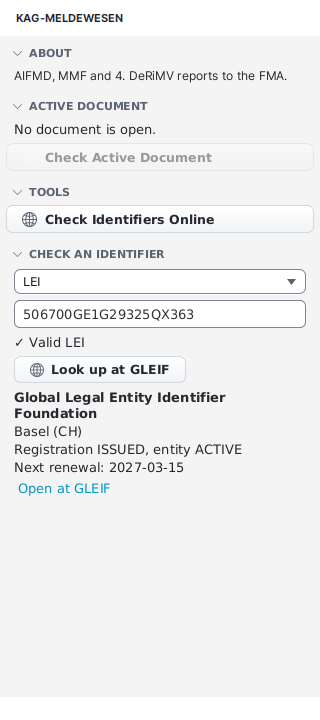
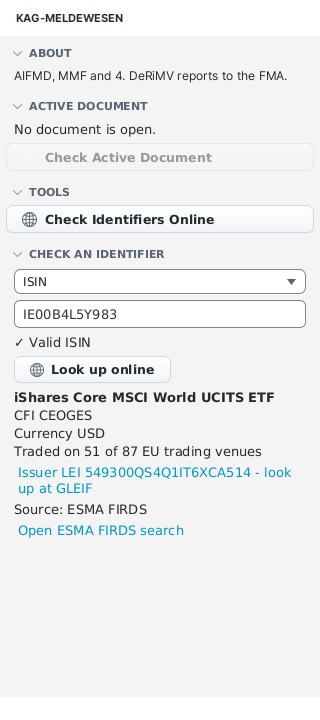
In the side panel of an extension that checks identifiers (KAG-Meldewesen, ESMA Reporting, FinDatEx, ISO 20022, FundsXML, PK-Meldewesen), choose the kind under CHECK AN IDENTIFIER and paste the value. When its check digits are right:
- LEI → Look up at GLEIF shows the legal name, the city and country of the legal address, the registration status
(
ISSUED,LAPSED,RETIRED,ANNULLED,PENDING_TRANSFER…), the entity status (ACTIVE/INACTIVE), the next renewal date and Open at GLEIF. - ISIN → Look up online shows the name, CFI code, currency and on how many EU trading venues it is traded now (or that it is no longer traded in the EU), with the issuer's LEI as a link that looks it up at GLEIF. An ISIN FIRDS does not know shows OpenFIGI's name, security type, ticker and FIGI.
Check every identifier of a document
Check Identifiers Online - in the TOOLS section of the extension panels, in the VALIDATE section of the FundsXML panel, the CHECK section of the PK-Meldewesen panel, and in Tools → Check Identifiers Online (LEI, ISIN) for any document - finds every LEI (20 characters with valid check digits) and every ISIN (country prefix and valid check digit) in the text (XML, CSV, JSON …), asks the services about all of them at once and puts a finding for each occurrence into the Problems panel, at its line:
| Answer | Finding |
|---|---|
XML: a 20-character value with wrong check digits in an LEI element or attribute (LEI, IssuerLEI, LEICode, LegalEntityIdentifier …) - checked locally, not sent to GLEIF |
Error |
| LEI not registered at GLEIF | Error |
LEI RETIRED, ANNULLED, DUPLICATE, MERGED, TRANSFERRED |
Error - must not be used any more |
LEI LAPSED (registration not renewed), entity INACTIVE |
Warning |
LEI PENDING_… |
Warning (info on the command line) |
| ISIN known neither to ESMA FIRDS nor to OpenFIGI | Warning |
| ISIN no longer traded on any EU trading venue | Warning (info on the command line) |
| Reported CFI code differs from the one in ESMA FIRDS | Warning |
| Reported issuer LEI differs from the one in ESMA FIRDS | Warning |
| ISIN not in FIRDS while OpenFIGI is switched off | Warning (info on the command line) |
CFI codes. In an XML document, a CFI field next to an ISIN - an element named ClssfctnTp, PdctClssfctn,
CFI or CFICode with a six-letter value, and exactly one ISIN in its nearest enclosing elements (up to three levels,
e.g. MMF AsstId, SFTR Scty) - is compared with the CFI code FIRDS has for that ISIN, position by position; an X
on either side (a construct such as DBXXXX, or "not applicable") matches anything. A difference is a warning at the
CFI field (rule ISIN-CFI). CFI fields next to several ISINs are not compared.
Issuer LEIs. Likewise, an LEI inside an issuer element (a name containing Issr, Issuer or Emittent up to three
levels above it: MMF IssrData/PtyId/LEI, SFTR Scty/Issr/Id) is compared with the issuer LEI FIRDS has for the one ISIN
in its nearest enclosing elements (up to five levels). Other LEIs next to an ISIN - counterparties, sponsors, the
reporting fund - are not compared. A difference is a warning at the LEI (rule ISIN-ISSUER); the LEI itself is still
checked at GLEIF.
An ISIN only OpenFIGI knows is no finding. The findings have the source GLEIF or ISIN and replace the online findings of an earlier check; schema and rule findings stay, also when the document is validated again while its text is unchanged. When one service cannot be reached, the panel says so and the other part still counts.
Example identifiers are skipped. Synthetic identifiers marked XMPL - an LEI starting with XMPL
(XMPL00FNDGLOBEQ00172), an ISIN whose national part starts with it (ATXMPLF01010) - are what the FundsXML sample
files use. They have valid check digits but belong to nobody, so no service knows them. They are not sent and get no
finding; the result names how many were skipped ("5 example identifiers (XMPL) not looked up"). Their check digits
are still checked locally. The hover shows "Synthetic example identifier" for them.
Open the entry. A finding row carries a link to the identifier's entry at the service that answered - GLEIF
(the LEI's record at search.gleif.org), ESMA FIRDS (the instrument's record in the ESMA register, as shown in the
register's details page) or OpenFIGI (a search for the ISIN, also for an ISIN neither service knows). Click it, or
right-click the row → Open at …, to see the entry in the browser; Copy Problem includes the address. The
Validation panel's problem list offers the same menu item. FIRDS answers cached by version 3.3.0 do not know the
record's page and are looked up again on the next check.
Many findings
Findings that usually need no change - an ISIN not in ESMA FIRDS or not traded on an EU venue, an LEI whose registration is pending - are hints (blue ⓘ), not warnings. In the Problems panel, group the findings by Security / object to see each ISIN or LEI once with all its occurrences, and use Fix ISIN … in Every Place to take the CFI code and issuer LEI from ESMA FIRDS in every place the document reports them (one undo step). See Large lists.
Progress, cancelling and continuing
A document with thousands of identifiers takes a while: GLEIF answers 200 LEIs per request and ESMA FIRDS 100 ISINs, at most one request a second each; OpenFIGI, asked about the ISINs FIRDS does not know, answers 10 per request and at most one request every 2.5 seconds without an API key. While the check runs, the panel shows:
- a bar over all requests, the time so far and Cancel;
- what runs now, for both services side by side - GLEIF: request 5 of 16 · LEIs 801–1000 of 3110 · ESMA FIRDS: request 23 of 87 · ISINs 2201–2300 of 8605; for OpenFIGI with the time left (OpenFIGI: request 12 of 310 · 3100 ISINs not in FIRDS · about 12 min left);
- how many identifiers are known from earlier checks (they are not asked again while their answer is recent);
- when OpenFIGI will take more than two minutes without an API key, the link Set an API key - about 10× faster, which opens Settings → Network & Security at the ISIN card.
GLEIF and the ISIN services are asked at the same time. Cancel stops at the next request (at most one request's wait): the findings of everything answered so far go to the Problems panel, and the panel says how many were not checked. Every answer is kept as soon as it arrives, so the next check - and a check after a service refused (OpenFIGI's too many requests) - asks only for the rest. Tools → Check Identifiers Online shows the same in a small window; Hide keeps the check running.
With every validation
Settings → Network & Security has a card for each kind: Check LEIs at GLEIF on every validation (F8) and Check ISINs online on every validation (F8) add the same checks to every validation of an XML document (F8, Validation panel, the extensions' Check Active Document). Both are off by default. When a service cannot be reached, the validation shows one warning and goes on. The Validation panel shows the online stage's progress with Cancel, which ends only that stage: the schema and rule findings are complete, the online findings cover what was answered.
Hover
When the mouse rests on an LEI or ISIN in the text editor, a tooltip shows what the services said about it - from the answers already known. Look up LEIs at GLEIF when the mouse rests on them / Look up ISINs when the mouse rests on them (off by default) also ask about identifiers not known yet.
Settings
| Setting | Key | Default |
|---|---|---|
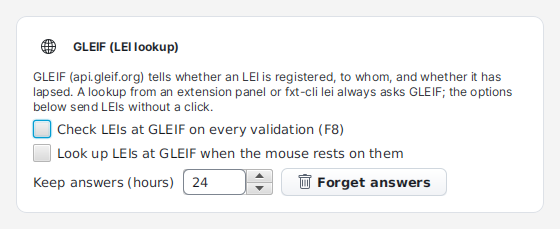
| Check LEIs at GLEIF on every validation (F8) | gleif.onValidation |
off |
| Look up LEIs at GLEIF when the mouse rests on them | gleif.hover |
off |
| Keep answers (hours), GLEIF | gleif.cacheHours |
24 |
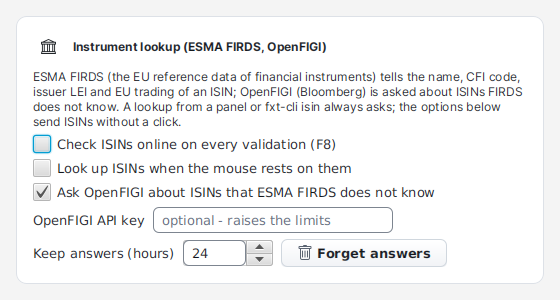
| Check ISINs online on every validation (F8) | isin.onValidation |
off |
| Look up ISINs when the mouse rests on them | isin.hover |
off |
| Ask OpenFIGI about ISINs that ESMA FIRDS does not know | isin.openfigi |
on |
| OpenFIGI API key (stored encrypted) | isin.openfigi.apiKey |
- |
| Keep answers (hours), ISINs | isin.cacheHours |
24 |
Forget answers empties the caches (~/.freeXmlToolkit/gleif/cache.json, ~/.freeXmlToolkit/isin/cache.json).
Requests go through the proxy of Settings → HTTP Proxy. Limits: GLEIF 60 requests a minute (the application sends
at most one a second, 200 LEIs each); FIRDS one request a second with 100 ISINs; OpenFIGI without an API key 25
requests a minute with 10 ISINs each, with a key (free at openfigi.com) 100 ISINs per
request and shorter pauses.
Command line
fxt-cli lei 506700GE1G29325QX363                  # one or more LEIs
fxt-cli lei --file report.xml -f json              # every LEI of a file, as JSON
fxt-cli isin IE00B4L5Y983                          # one or more ISINs
fxt-cli isin --file holdings.xml --no-openfigi     # every ISIN of a file, FIRDS only
fxt-cli validate reports/ --gleif --isin           # validation plus the online checks
fxt-cli lei exits with 1 when an LEI is invalid, unknown, lapsed, retired or annulled or its entity inactive;
fxt-cli isin with 1 when an ISIN is invalid or known to neither service; both with 3 when a service cannot be
reached. validate --gleif / --isin add the findings to the report (sources GLEIF / ISIN, rules GLEIF-LEI /
ISIN-LOOKUP); an unreachable service is an info there. The OpenFIGI API key comes from FXT_OPENFIGI_APIKEY or
the setting. Example identifiers (XMPL) found in a file are not looked up: lei --file / isin --file list them as
"synthetic example identifier" (examples in JSON), validate adds one info with their number; an XMPL value
given on the command line itself is looked up. The command line ignores the GUI settings "on every validation" - only --gleif / --isin turn the
checks on. In a terminal, lei, isin and validate --gleif/--isin show the progress in one line on stderr
(nothing when the output is redirected). See Command Line.