XBRL (with Arelle)
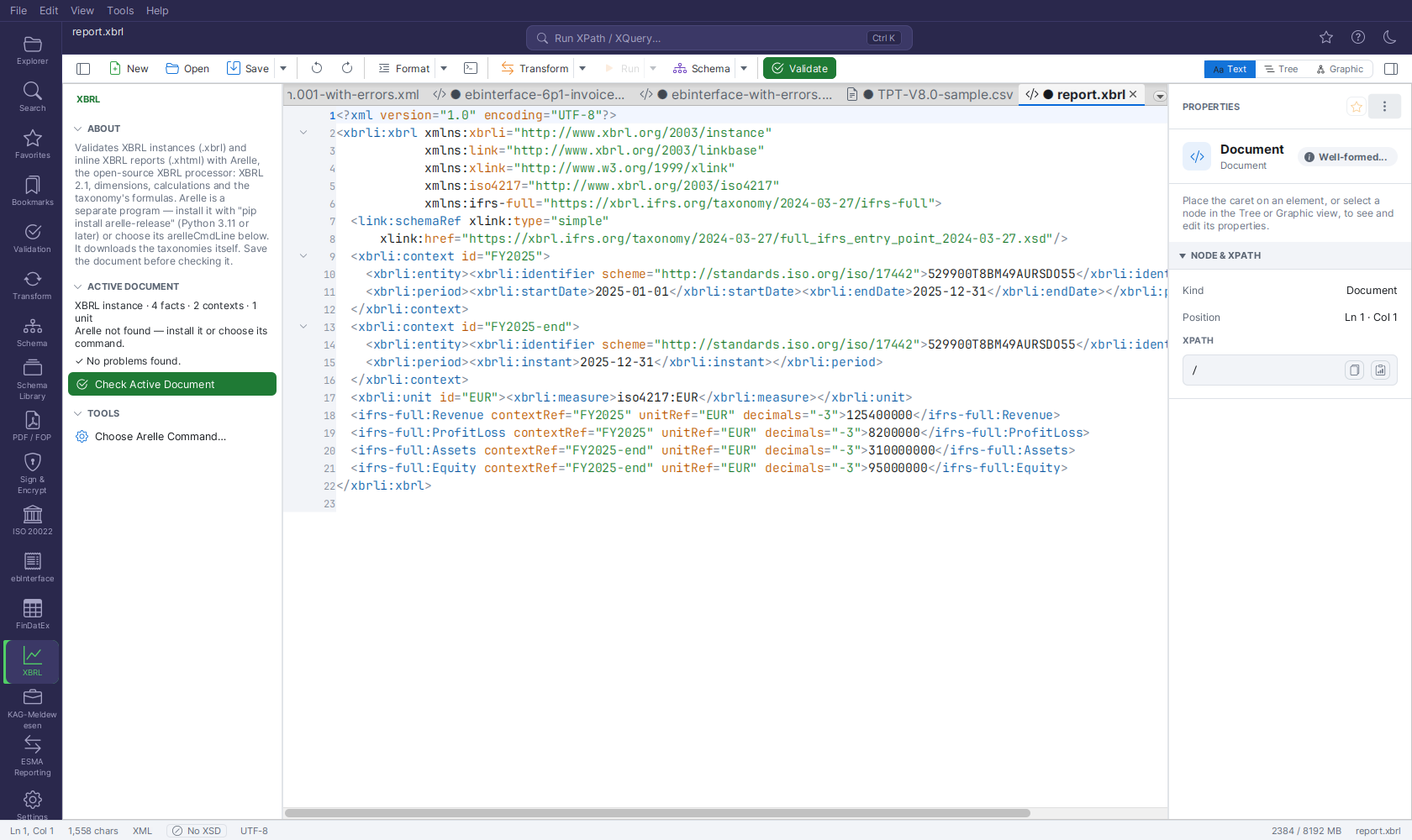
XBRL (eXtensible Business Reporting Language) is the XML standard for financial and regulatory reports — annual reports in ESEF, supervisory reports (COREP, FINREP, Solvency II QRTs) and many more. The XBRL extension recognises XBRL instances and inline XBRL reports, shows what they contain and validates them with Arelle, the open-source XBRL processor.
It is one of the industry extensions and off by default.
Why Arelle?
An XBRL document is only meaningful together with its taxonomy: the schemas and linkbases it references, which define the concepts, the dimensions and the calculation and formula rules. Validating XBRL means XBRL 2.1, XBRL Dimensions, calculation linkbases and XBRL Formula — exactly what Arelle does, and what a plain XML Schema validation cannot do. FreeXmlToolkit therefore runs Arelle as a separate program. Arelle is not bundled; you install it once.
Setting it up
- Switch the extension on: Settings → Extensions → INSTALLED EXTENSIONS, tick XBRL (with Arelle), save, restart. A chart icon (XBRL) appears in the Activity Bar.
-
Install Arelle (Python 3.11 or later):
This puts the command
arelleCmdLineon the PATH (Windows:arelleCmdLine.exein Python'sScriptsfolder). With a virtual environment orpipx install arelle-releaseit lands in that environment'sbin/Scriptsfolder instead. -
Tell FreeXmlToolkit where it is, if it is not on the PATH: click Choose Arelle Command… in the XBRL side panel and pick the
arelleCmdLineprogram. The choice is stored in the settingplugin.xbrl.arelleCommand; leave it empty to search the PATH again. On Windows.exe,.cmdand plain names are searched.
The side panel shows which Arelle is used (Arelle: /home/me/.local/bin/arelleCmdLine) or
"Arelle not found — install it or choose its command."
Which documents it handles
| Kind | Recognised by |
|---|---|
XBRL instance (.xbrl, .xml) |
root element xbrl in the namespace http://www.xbrl.org/2003/instance |
Inline XBRL report (.xhtml, .html) |
root element html and the inline XBRL namespace http://www.xbrl.org/2013/inlineXBRL in the document |
The side panel
ACTIVE DOCUMENT — what the document contains:
- facts: in an instance, the elements with a
contextRefthat are not part of the XBRL structure itself; in inline XBRL, theix:nonFraction(numbers) andix:nonNumeric(texts) elements; - contexts (
xbrli:context) and units (xbrli:unit); - which Arelle is used.
Check Active Document runs Arelle on the saved file: Arelle reads the file from disk and resolves the taxonomy references relative to it. Save the document first — for an unsaved document the check reports "Save the document first: Arelle reads the file and its taxonomy references." Unsaved changes in the editor are not seen by Arelle.
The command run is
arelleCmdLine -f <file> -v --logFile <temporary file>.json --logFileMode w --logFormat "%(message)s"
Arelle writes its messages as JSON into the temporary file, which is read and deleted afterwards.
-v validates the instance against its taxonomy: XBRL 2.1, dimensions, calculations and the
taxonomy's formulas. The result shows Arelle's errors and warnings with their code and line,
for example
Line 57: [xbrl.4.6.2:numericUnit] Fact eu:Assets of context C1 must have a unit
Line 112: [xbrldie:PrimaryItemDimensionallyInvalidError] …
Information messages (timings, loading progress) are left out. Inconsistencies and fatal messages count as errors. Lines are given when Arelle names a place in the checked file; problems in the taxonomy have no line. Show All Problems opens the full list as a text document.
A run stops after 10 minutes ("Arelle did not finish within 10 minutes."). Large taxonomies take a while on the first run because Arelle downloads them; later runs use Arelle's cache.
Taxonomies and network
Arelle loads the taxonomies the document references (link:schemaRef) from the internet and
caches them, with its own network settings. The proxy settings of FreeXmlToolkit do not apply
to it; configure a proxy for Arelle with its --proxy option in a wrapper script, or through the
HTTP_PROXY / HTTPS_PROXY environment variables. For offline machines, prepare Arelle's cache or
taxonomy packages (--packages) and point the extension to a wrapper script that adds these options.
In scripts
XBRL documents are not checked by the Validation panel or fxt-cli validate
(those see them as plain XML). Run Arelle directly in scripts and pipelines:
Troubleshooting
| Problem | Solution |
|---|---|
| "Arelle was not found." | Install it with pip install arelle-release, or choose arelleCmdLine with Choose Arelle Command…. A configured path that no longer exists also counts as not found. |
| "Save the document first …" | Save the file; Arelle reads it from disk. |
| "Arelle wrote no log (exit code …)" | Arelle could not start or crashed. Run the command above in a terminal to see its output (e.g. a missing Python package). |
| The file name contains characters that cmd.exe would interpret | On Windows a .cmd/.bat launcher cannot safely receive names with & | < > ^ % ! or quotes. Rename the file or choose arelleCmdLine.exe instead of a script. |
| Taxonomy cannot be loaded | Arelle needs the internet (or a taxonomy package) — see Taxonomies and network. |
| The check takes long | The first run downloads the taxonomy; later runs are faster. |