ebInterface (Austrian e-invoice)
ebInterface is the Austrian XML standard for electronic invoices, accepted by the federal e-invoicing portal (e-Rechnung.gv.at) and many companies. The ebInterface extension binds its schemas automatically, recalculates the invoice — line amounts, taxes, totals, payable amount — checks VAT ids and bank details and gives you a sample invoice to start from.
It is one of the industry extensions and off by default.
Switching it on
- Open Settings → Extensions → INSTALLED EXTENSIONS.
- Tick ebInterface (Austrian e-invoice) and save the settings.
- Restart FreeXmlToolkit.
A receipt icon (ebInterface) then appears in the Activity Bar. Administrators can keep the
extension off with plugin.ebinterface.enabled=false (see Administration).
Which documents it handles
XML documents whose root element is Invoice in a namespace
http://www.ebinterface.at/schema/<version>/, for example http://www.ebinterface.at/schema/6p1/.
The version is taken from the namespace (6p1 → 6.1). All document types share the root Invoice
— the DocumentType attribute says whether it is an invoice, credit memo, final settlement and so on.
Schemas
While the extension is on, the Schema Library contains entries (source Extension)
for the versions 4.1, 4.2, 4.3, 5.0, 6.0 and 6.1. Opening an invoice binds the schema of its
version by namespace. The schemas are downloaded from the standard's repository on GitHub
(austriapro/ebinterface-standards, file schemas/ebInterface<version>/Invoice.xsd) the first time
they are needed and cached; the schemas they import (e.g. XML Signature) are resolved the same way.
The side panel
ABOUT — what the extension checks.
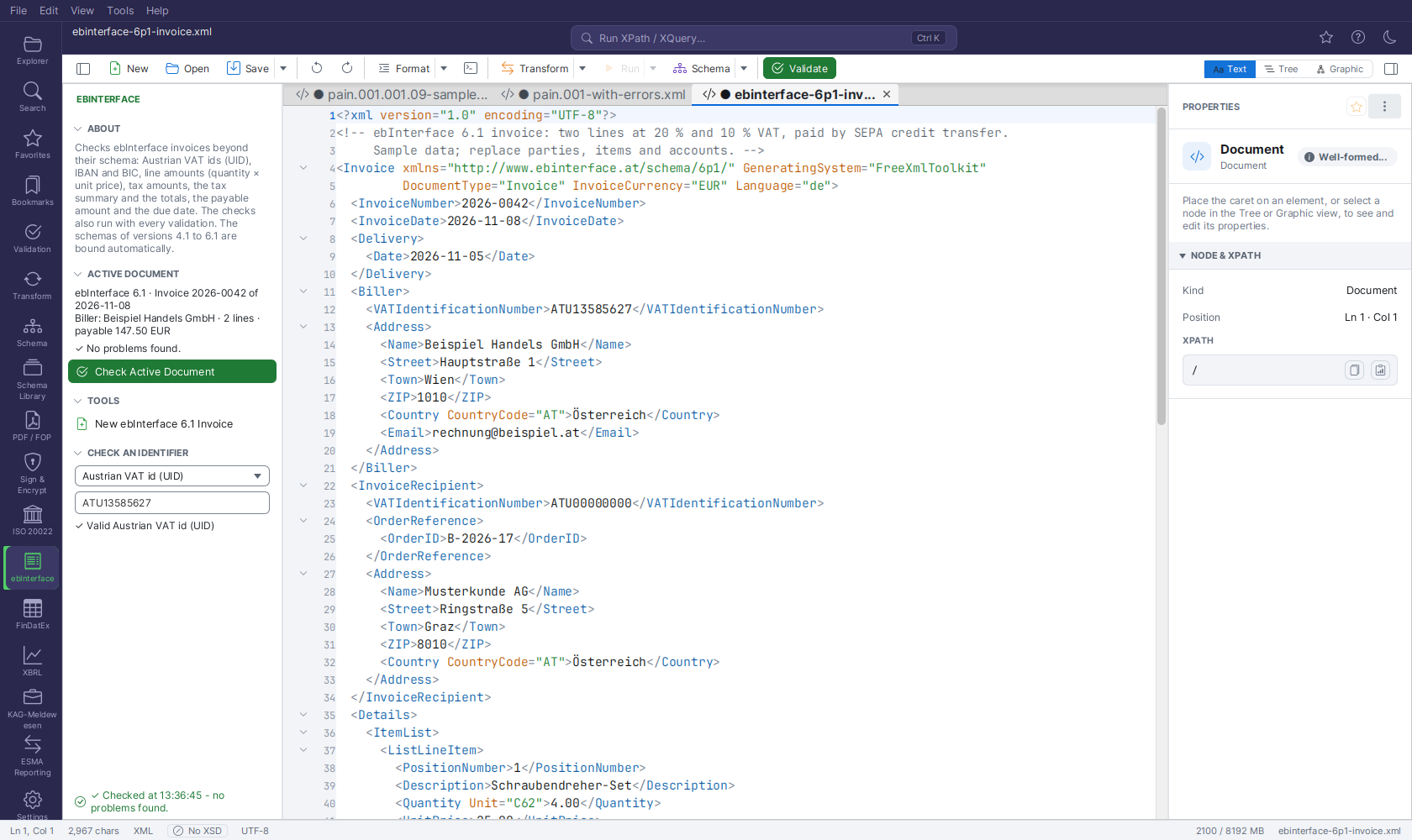
ACTIVE DOCUMENT — a summary of the open invoice:
ebInterface 6.1 · Invoice 2026-0042 of 2026-11-08
Biller: Beispiel Handels GmbH · 2 lines · payable 147.50 EUR
- version, document type (
DocumentType), invoice number and date; - the biller's name (
Biller/Address/Name); - the number of invoice lines (
ListLineItem); - the payable amount (
PayableAmount) in the invoice currency (InvoiceCurrency).
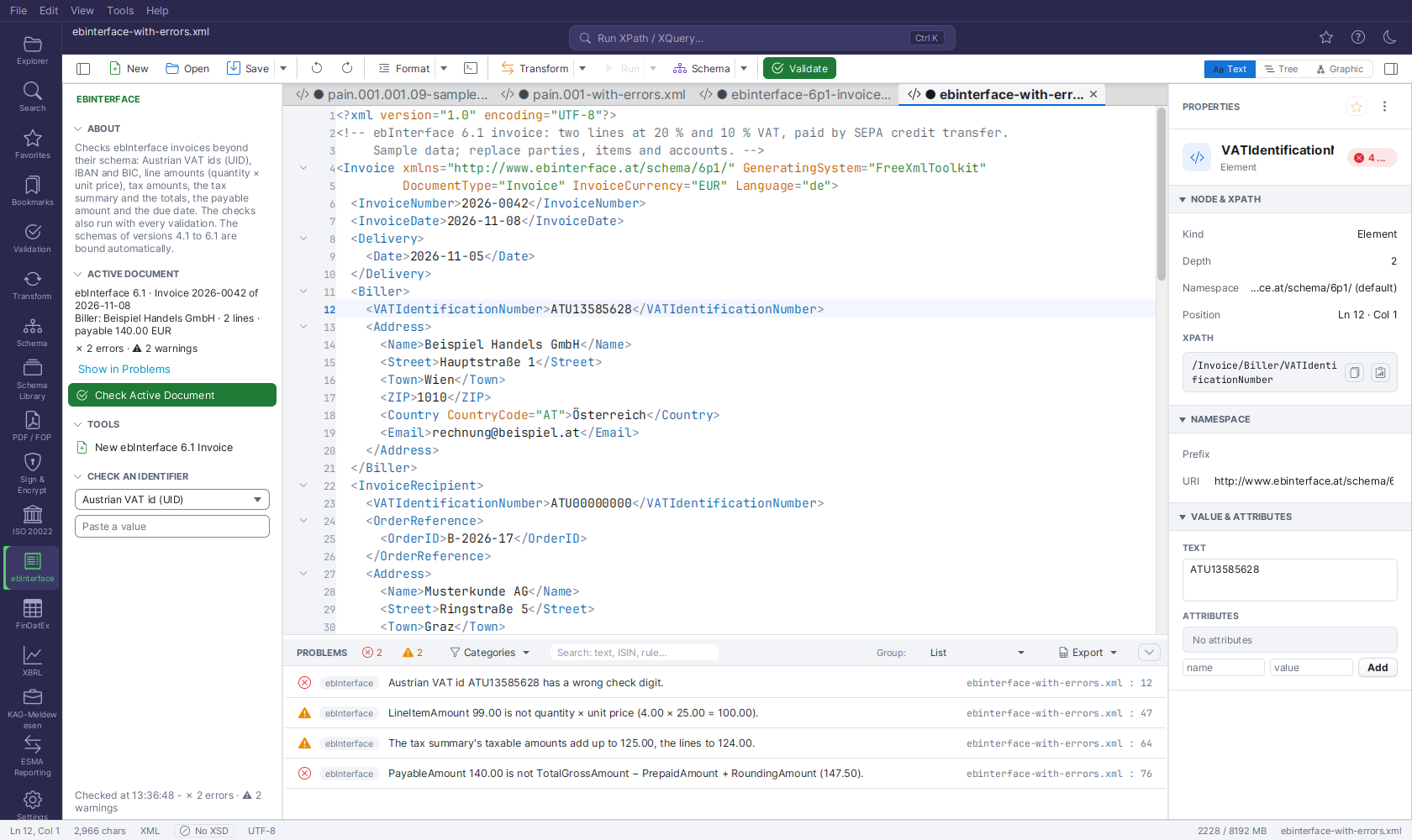
Check Active Document runs the checks below on the editor's text (saving is not needed). The result shows the number of problems and the first ten with their line; Show All Problems opens the complete list as a text document.
New ebInterface 6.1 Invoice opens a schema-valid sample invoice as a new document: a biller and a recipient, two lines at 20 % and 10 % VAT, the tax summary, totals and payment by SEPA credit transfer. Replace parties, items and accounts with your own data.
CHECK AN IDENTIFIER — choose Austrian VAT id (UID), IBAN or BIC and paste a value:
- UID:
ATUand eight digits, the last one a check digit after the algorithm of the Austrian tax administration (✗ "ATU1234567" is not an Austrian VAT id (ATU and 8 digits).); - IBAN: length of the country and check digits; BIC: form after ISO 9362.
Checks
The checks follow the rules of the ebInterface 6.1 specification. They run from the side panel and
with every validation of an ebInterface invoice — the Validation panel,
F8 and fxt-cli validate — with the source ebInterface, next to the schema's problems.
Identifiers
| Check | Severity | Example message |
|---|---|---|
every VATIdentificationNumber starting with ATU: format and check digit. ATU00000000 (the recipient has no UID) is accepted; ids of other countries are not checked |
error | "ATU1358562" is not an Austrian VAT id (ATU and 8 digits). |
every IBAN: country length and check digits |
error | IBAN AT611904300234573202 has wrong check digits. |
every BIC |
error | "BKAUATW" is not a BIC (8 or 11 characters: bank, country, location, optional branch). |
Amounts
| Check | Severity | When it is skipped |
|---|---|---|
Line amount: LineItemAmount = Quantity × UnitPrice (÷ the BaseQuantity attribute of UnitPrice, e.g. a price per 100 pieces) |
warning | lines with a surcharge, reduction or other VAT-able tax (any element in the line whose name contains Reduction, Surcharge or OtherVATableTax) |
Tax amount: TaxAmount = TaxableAmount × TaxPercent ÷ 100, for every TaxItem (in lines and in the tax summary) and OtherVATableTax |
warning | — |
Tax summary against the lines: the taxable amounts of Invoice/Tax/TaxItem add up to the line amounts |
warning | invoices with surcharges or reductions on invoice level (ReductionAndSurchargeDetails) |
Gross total: TotalGrossAmount = taxable amounts + taxes of the tax summary |
warning | invoice-level surcharges or reductions, OtherTax |
Payable amount: PayableAmount = TotalGrossAmount − PrepaidAmount + RoundingAmount |
error | invoices with below-the-line items (BelowTheLineItem) |
Due date: PaymentConditions/DueDate is not before InvoiceDate |
warning | dates not in the form YYYY-MM-DD |
The first four allow a difference of one cent for rounding; the payable amount must match exactly. Every message names the expected value, for example:
LineItemAmount 120.00 is not quantity × unit price (3 × 50.00 = 150.00).
TaxAmount 25.00 is not 20 % of 100.00 (20.00).
The tax summary's taxable amounts add up to 125.00, the lines to 150.00.
TotalGrossAmount 147.00 is not taxable amounts plus taxes of the tax summary (147.50).
PayableAmount 140.00 is not TotalGrossAmount − PrepaidAmount + RoundingAmount (147.50).
The due date 2026-11-01 is before the invoice date 2026-11-08.
Typical workflow
- New ebInterface 6.1 Invoice — or open an invoice your ERP system produced.
- Edit it in the Text, Tree or Grid view; the schema provides auto-completion.
- Press F8: schema errors and the arithmetic checks appear together; click a problem to jump to it.
- Before uploading to e-Rechnung.gv.at, check the saved file in a script:
What is not checked
- The business rules of the e-Rechnung.gv.at portal that go beyond the specification (e.g. the order reference of the federal government, the supplier id).
- VAT ids of other countries, and whether a UID is registered (only its check digit; use the EU VIES service for that).
- Calculations in lines with surcharges or reductions, and totals with invoice-level surcharges, reductions or other taxes — they are skipped rather than reported wrongly.
- Older versions are checked with the same 6.1 rules; elements that do not exist there are simply not found.
Troubleshooting
| Problem | Solution |
|---|---|
| No schema is bound | Only versions 4.1–6.1 are registered, and GitHub must be reachable once for the download (proxy in Settings → Network & Security). |
| A warning about a line amount although the invoice is right | The line probably uses a price unit (BaseQuantity) or a discount that is not written as surcharge/reduction. Warnings do not make the document invalid. |
| The check button is disabled | The root is not Invoice in an http://www.ebinterface.at/schema/… namespace. |