FreeXmlToolkit Documentation
Free, open-source desktop app for XML, XSD, XSLT, Schematron and JSON – Windows, macOS and Linux. No registration, no admin rights needed.
Windows x64 · Windows 10/11
Download .exe installer- MSI package – for silent / Group Policy deployment
- Portable ZIP – no installation, extract and run
macOS Apple Silicon & Intel
Download .dmg (Apple Silicon)- Intel .dmg – for Intel-based Macs
- .pkg installer (Apple Silicon) · .pkg (Intel)
- Portable ZIP (Apple Silicon) · Portable ZIP (Intel)
Linux x64
Download .deb package- .rpm package – Fedora, RHEL, openSUSE
- .deb is for Ubuntu, Debian and Linux Mint
- Portable ZIP – any distribution, extract and run
Welcome
FreeXmlToolkit is a free desktop application for working with XML files. It helps you edit, validate, transform, and secure your XML documents - all in one place.
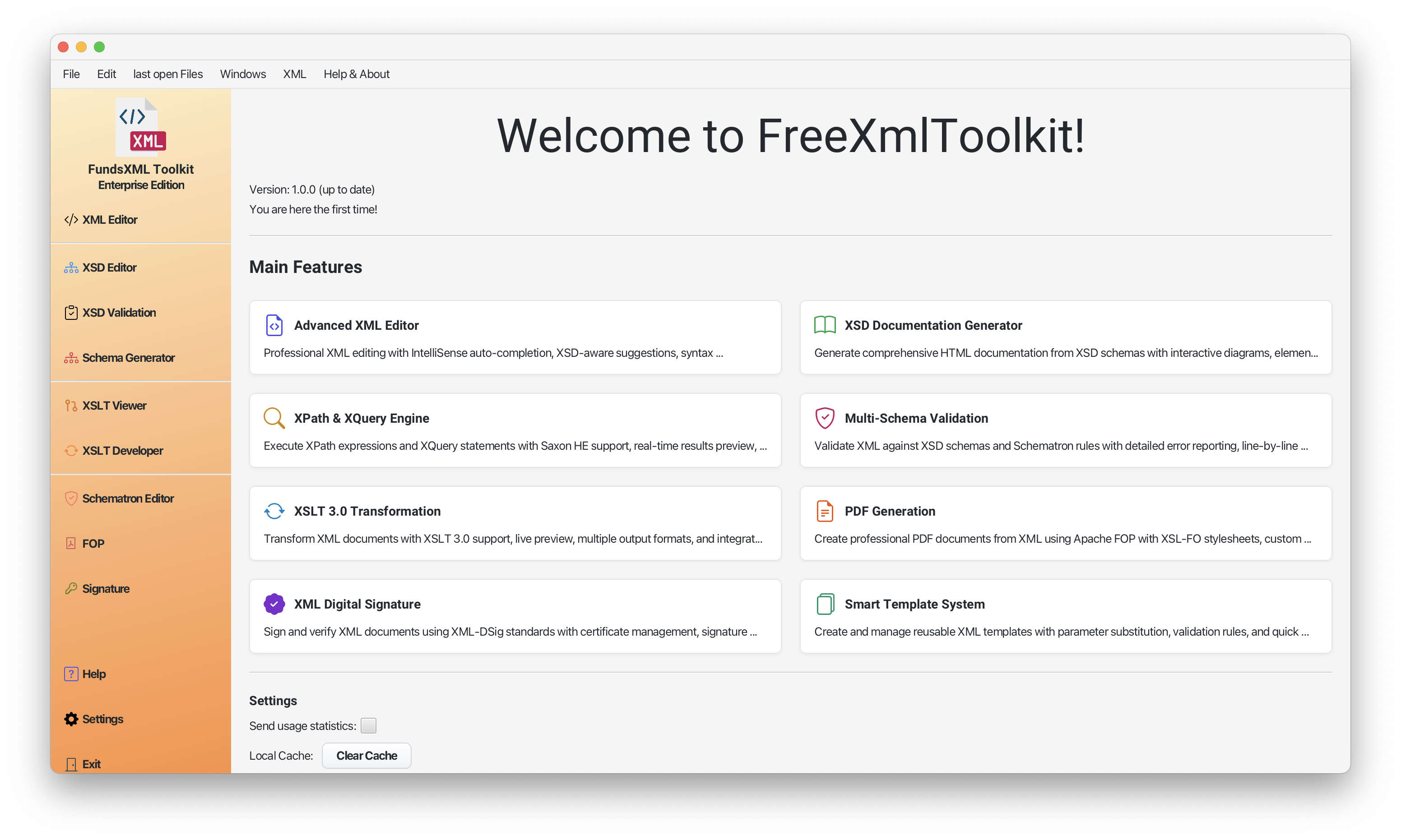 Screenshot: Main application window
What Can You Do With FreeXmlToolkit?
- Edit XML files with smart auto-completion and syntax highlighting
- Validate XML against XSD schemas to check for errors
- Validate JSON against JSON Schemas, auto-detected from the document's
$schemamember - Transform XML into other formats (HTML, PDF, Text)
- Sign XML documents with digital certificates
- Create business rules with Schematron validation
- Generate documentation from your XSD schemas
Works On All Platforms
FreeXmlToolkit is available for Windows, macOS, and Linux in multiple formats. Choose the one that works best for you - all files are published on the GitHub Releases page (see the download buttons above).
Windows
| Format | Architecture | Description |
|---|---|---|
.exe |
x64 | Installer - Standard setup wizard. No admin rights required. Recommended for most users. |
.msi |
x64 | MSI Package - For enterprise deployment and silent installation via Group Policy. |
.zip |
x64 | Portable - No installation needed. Extract and run. Good for USB drives or restricted systems. |
macOS
| Format | Architecture | Description |
|---|---|---|
.dmg |
Intel (x64), Apple Silicon (ARM64) | Disk Image - Standard macOS installation. Drag to Applications folder. |
.pkg |
Intel (x64), Apple Silicon (ARM64) | Package Installer - Guided installation wizard. Useful for managed deployments. |
.zip |
Intel (x64), Apple Silicon (ARM64) | Portable - No installation needed. Extract and run the app directly. |
Linux
| Format | Architecture | Description |
|---|---|---|
.deb |
x64 | Debian Package - For Ubuntu, Debian, Linux Mint. Install with sudo dpkg -i or double-click. |
.rpm |
x64 | RPM Package - For Fedora, Red Hat, openSUSE. Install with sudo rpm -i or dnf install. |
.zip |
x64 | Portable - No installation needed. Extract and run. Works on any Linux distribution. |
Note: On macOS, pick the build that matches your Mac: Apple Silicon (ARM64) for M-series Macs, Intel (x64) for older Macs (Apple menu → About This Mac shows the chip). Windows and Linux builds are provided for x64 (Intel/AMD) only.
Feature Overview
XML Editor
Edit your XML files with professional tools:
| Feature | What It Does |
|---|---|
| Auto-Completion | Suggests valid elements and attributes as you type |
| Syntax Highlighting | Colors your XML for easier reading |
| Instant Validation | Shows errors immediately as you edit |
| Find & Replace | Search and replace text in your documents |
| Find in Files | Search and replace across all files of a folder - by plain text or by XPath (the Search activity, Ctrl+Shift+F) |
| Code Folding | Collapse sections to focus on what matters |
Learn more: XML Editor Guide | Editor Features
JSON Editor
Edit and validate JSON files with multiple format support:
| Feature | What It Does |
|---|---|
| Multi-Format Support | Edit .json, .jsonc and .json5 files, including JSONC-style comments and JSON5 syntax |
| Tree View | Navigate JSON structure visually |
| Grid View | Edit JSON in the same XMLSpy-style grid as XML - arrays of objects as tables, type-aware inline editing, undo/redo |
| JSONPath Queries | Extract data using JSONPath expressions |
| Schema Validation | Validate against JSON Schema (Draft-07, 2019-09, 2020-12) - the schema is auto-detected from the document's $schema member, or bound manually; problems appear with line numbers |
| Hover Information | See JSONPath and type info on hover |
Learn more: JSON Editor Guide
XSD Schema Tools
Work with XML Schema files:
| Feature | What It Does |
|---|---|
| Visual Schema Viewer | See your schema as an interactive diagram |
| Documentation Generator | Create HTML documentation from schemas |
| Sample XML Generator | Generate valid sample XML files with customizable rules |
| Profiled Generation | Control values per element, save profiles, batch generate |
| Schema Flattening | Combine multiple schema files into one standalone schema, optionally reduced for validation servers |
| Schema Analysis | Statistics, a type library with one-click removal of unused components, quality checks, identity-constraint and XPath validation - exportable as CSV, JSON, HTML, PDF or Excel |
| Schema Library & XML Catalogs | Map namespaces to schema files, register OASIS catalog.xml files, and manage the cache of downloaded schemas - documents without a schema reference bind automatically |
Learn more: XSD Tools Guide | Profiled XML Generation | XSD Validation | Schema Library
XSLT Transformation
Convert XML into other formats:
| Feature | What It Does |
|---|---|
| Multi-Format Output | Generate XML, HTML, Text, or JSON |
| Live Preview | See results as you work |
| Rendered HTML Results | Open an HTML result as an editor tab showing the rendered page (Preview view) |
| Modern XSLT Support | Uses the latest XSLT 3.0 standard |
| Multi-File Batch Processing | Process multiple XML files with one XQuery using collection() |
| XProc 3.0 Pipelines | Run multi-step processing pipelines (.xpl) with the built-in XML Calabash engine |
Learn more: XSLT Viewer | XSLT Developer | XProc Pipelines
PDF Generation
Create professional PDF documents:
| Feature | What It Does |
|---|---|
| XSL-FO Support | Use XSL-FO stylesheets for formatting |
| High-Quality Output | Professional PDF generation |
Learn more: PDF Generation Guide
Digital Signatures
Sign and verify XML documents:
| Feature | What It Does |
|---|---|
| Create Certificates | Generate your own signing certificates |
| Sign Documents | Add digital signatures to XML files |
| Verify Signatures | Check if signed documents are valid |
Learn more: Digital Signatures Guide
Appearance
| Feature | What It Does |
|---|---|
| Dark Mode | Switch between light and dark themes to suit your preference |
| Modern UI | Clean, modern interface powered by the AtlantaFX theme |
Schematron Validation
Define custom business rules:
| Feature | What It Does |
|---|---|
| Business Rules | Validate beyond basic XML structure |
| Visual Rule Builder | Create rules without writing code |
| Detailed Reports | Get clear validation results |
| Quick Fixes (SQF) | Correct rule violations automatically with one click |
Learn more: Schematron Guide | Quick Fixes
FundsXML Extensions (Optional)
Opt-in integration with the FundsXML industry standard for fund data exchange:
| Feature | What It Does |
|---|---|
| Automatic Downloads | Schemas, samples, rules and snippets are fetched from GitHub and kept up to date automatically |
| Sample Library | One-click access to FundsXML example documents via Favorites and the Welcome page |
| Quick-Validate | Check any open XML against the active FundsXML schema with one click in the FundsXML panel |
| Schematron Rules | Ready-made business-rule checks for FundsXML documents |
| Query Snippets | Pre-built XPath/XQuery expressions, ready to load in the Query Console |
This feature is off by default. Enable it from Settings only if you work with FundsXML files.
Learn more: FundsXML Extensions Guide
Getting Started
Installation
- Download the package for your operating system using the download buttons at the top of this page (or from the GitHub Releases page)
- Install it:
- Windows: run the
.exeinstaller (no administrator rights required) or the.msi; the portable.ziponly needs to be extracted - macOS: open the
.dmgand drag FreeXmlToolkit to Applications, or run the.pkginstaller - Linux:
sudo dpkg -i freexmltoolkit-*.deb(Debian/Ubuntu) orsudo rpm -i freexmltoolkit-*.rpm(Fedora/RHEL/openSUSE); the portable.ziponly needs to be extracted
- Windows: run the
- Launch FreeXmlToolkit from your applications menu (portable: run
FreeXmlToolkit/FreeXmlToolkit.exein the extracted folder)
Your First Steps
- Open a file: The app opens into the Unified Shell - use the Explorer activity or Open (Ctrl+O), or drag files into the window
- Edit multiple files: The shell handles XML, XSD, XSLT, Schematron and JSON files in tabs, each with Text / Tree / Graphic views - HTML files get a rendered read-only Preview view instead
- Start editing: Type
<to see auto-completion suggestions - Validate: Use the Validation activity (or the toolbar's Validate button, F8) to check your document for errors
- Reach every tool: Pick a tool from the activity bar on the left (Explorer, Search, Favorites, Validation, Transform, Schema, Schema Library, PDF/FOP, Signature, FundsXML, Help, Settings)
Learn more: Unified Shell Guide
Sample Files
The application includes example files in the examples/ folder to help you get started:
- xml/ - Sample XML documents (FundsXML4 instances, valid and deliberately invalid)
- xsd/ - Sample XSD schemas (including FundsXML 4.2.11)
- xslt/ - XSLT stylesheets (HTML reports, JSON and CSV export)
- xsl/ - XSL-FO stylesheets for PDF reports
- xquery/ - XQuery 3.1 data-quality checks
- xpath/ - XPath 3.1 snippets for the Query Console
- xproc/ - XProc 3.0 pipelines (identity, slimming, CSV/JSON export, reports)
- schematron/ - Schematron business rules
- catalog/ - OASIS XML catalog example for the Schema Library
- json/ - JSON Schema validation demos (
$schemaauto-binding, valid/invalid instances, Draft-07 / 2019-09 / 2020-12 dialects) - signature/ - Signed XML document with demo keystore
- templates/ - XML snippet templates
- profiles/ - XML generation profiles
Troubleshooting
Application Does Not Start (Windows)
On some Windows computers, the application may fail to start or crash immediately after launch. This is typically caused by incompatible graphics drivers.
What to try:
- Update your graphics drivers -- Visit your GPU manufacturer's website (NVIDIA, AMD, or Intel) and install the latest driver for your graphics card.
- Try the portable version -- If you used the installer (.exe or .msi), try the portable (.zip) version instead.
- Report the issue -- If the problem persists, please report it on the project's GitHub Issues page with your Windows version and graphics card model.
Note: Since version 1.6.3, FreeXmlToolkit picks a safe renderer automatically (software rendering on graphics adapters it does not recognise). You can force hardware or software rendering under Settings → RENDERING; the change takes effect after a restart.
Application Looks Blurry or Slow
If the interface appears blurry or animations are slow, your system may be using software rendering instead of hardware acceleration. Updating your graphics drivers usually resolves this.
Keyboard Shortcuts
| Shortcut | Action |
|---|---|
Ctrl+N |
New file |
Ctrl+O |
Open file |
Ctrl+S / Ctrl+Shift+S |
Save / Save As |
Ctrl+Z |
Undo |
Ctrl+Y (or Ctrl+Shift+Z) |
Redo |
Ctrl+F |
Find text |
Ctrl+H |
Find and replace |
Ctrl+Shift+F |
Find in Files (search across a folder) |
Ctrl+Shift+H |
Replace in Files |
Shift+Alt+F |
Format (pretty-print) the document |
F8 |
Validate the current document |
Ctrl+Enter |
Run the current transformation / query |
F5 |
Execute: run a query / stylesheet / pipeline, or validate any other document |
F1 |
Open the Help panel |
F11 |
Toggle full screen |
Ctrl+T |
Insert a template |
Ctrl+Shift+X |
Toggle the Query Console |
Ctrl+D / Ctrl+Shift+D |
Add current file to Favorites / show the Favorites panel |
Ctrl+K |
Open the Query Console (same as the header search field) |
Ctrl+L / Ctrl+Shift+P |
Show/hide the left side panel / the Properties inspector |
Ctrl+E |
Spreadsheet Converter (Excel / CSV ↔ XML) |
Alt+Enter (or Ctrl+.) |
Apply a Schematron Quick Fix |
< |
Open auto-completion |
Enter |
Accept suggestion |
Escape |
Close popup |
Documentation Pages
Feature Guides
| Page | Description |
|---|---|
| Unified Shell | The single workspace - start here |
| XML Editor | How to edit XML files |
| XML Editor Features | Detailed editor features |
| JSON Editor | How to edit JSON files |
| XSD Tools | Working with XML schemas |
| Profiled XML Generation | Advanced sample XML generation with profiles |
| XSD Validation | Validating XML against schemas |
| Schema Library | Namespace mappings, XML catalogs, schema cache |
| XSLT Viewer | Quick XSLT transformations |
| XSLT Developer | Full XSLT/XQuery development environment |
| PDF Generator | Creating PDF documents |
| Digital Signatures | Signing XML documents |
| Schematron Support | Business rule validation |
| Schematron Quick Fixes | One-click fixes for Schematron findings |
| FundsXML Extensions | Optional FundsXML standard integration |
Productivity Tools
| Page | Description |
|---|---|
| Auto-Completion (IntelliSense) | Smart suggestions while typing |
| Favorites System | Quick access to your files |
| Template Management | Reusable code snippets |
| Schema Support | Supported schema formats |
| File Associations | Open XML, XSD, XSLT and more from your file manager |
| Execution Statistics | Optional timing statistics for validations, transformations and other operations |
Reference
| Page | Description |
|---|---|
| Security Features | Built-in protections against XML attacks |
| Privacy & Anonymous Telemetry | What the anonymous usage statistics and error reports contain, and how to switch them off |
| Technology Stack | Libraries and versions used |
| Third-Party Licenses | License information |
Support the Project
FreeXmlToolkit is free and open source. If it saves you time, please consider sponsoring its development — sponsorships directly fund maintenance, bug fixes and new features.
Inside the application the sponsor link is available in the Help panel (Sponsor this Project), in the About dialog, on the Welcome page and under Settings → Support the Project. Starring the repository and reporting bugs helps too.
Need Help?
- Browse the documentation pages listed above
- Check the example files included with the application
- Report issues on the project's GitHub page, or send an anonymous report from inside the app with Help → Report a Problem…
Quick Links
Editors: Unified Shell | XML Editor | XML Features | JSON Editor | XSD Tools | Profiled XML Generation | XSD Validation | XSLT Viewer | XSLT Developer | PDF/FOP | Signatures
Features: IntelliSense | Schematron | FundsXML Extensions | Schema Support | Favorites | Templates
Reference: Security | Privacy & Telemetry | Tech Stack | Licenses