Schematron Validation
Schematron lets you create custom validation rules that go beyond what XSD schemas can check. It's perfect for validating business rules and data relationships.
Before you start
- An XML document and a Schematron file (
.sch).
Overview
While XSD schemas check the structure of your XML (which elements can appear where), Schematron checks the content and relationships:
| XSD Checks | Schematron Checks |
|---|---|
| Element names | Data values |
| Element order | Field relationships |
| Required fields | Business rules |
| Data types | Conditional requirements |
Example Rules
- "If status is 'approved', an approval date must be present"
- "The total must equal the sum of all line items"
- "Each ID must be unique in the document"
Toolbar
Schematron files use the single-row editor toolbar. Related actions sit in split buttons with a visible ▾ arrow menu; see Workspace - Toolbar for the full reference.
With a .sch file active, the relevant actions are:
| Button | Shortcut | Description |
|---|---|---|
| New | Ctrl+N | Open the guided New File dialog (includes Schematron) |
| Open | Ctrl+O | Open an existing file |
| Save ▾ | Ctrl+S | Save the current file; the arrow menu holds Save As… (Ctrl+Shift+S) and Save All |
| Undo / Redo | Ctrl+Z / Ctrl+Y | Undo / redo the last change (icon buttons) |
| Format ▾ | Shift+Alt+F | Pretty-print the file. (Note: Ctrl+Shift+F opens Find in Files, not document search.) |
| Validate | F8 | Check that the Schematron file is well-formed XML (the result appears in the Validation panel's PROBLEMS list). Use Check Rules for a deeper rule-level inspection |
| Query Console | Ctrl+Shift+X | Toggle the bottom XPath/XQuery console — the place to try out rule expressions |
Rule templates, the tester, the visual builder, and Check Rules are reached through the Validation activity panel (see Schematron Tools in the Validation Panel).
Editing Schematron Files
A .sch (or .schematron) file opens as a normal file tab in the shell's editor — there is
no separate Schematron editor. The document is detected as Schematron by its namespace
(http://purl.oclc.org/dsdl/schematron), which enables:
- Syntax highlighting and IntelliSense for Schematron elements (
pattern,rule,assert,report, …) in the Text view - A Tree view of the file's patterns, rules, and assertions (switch views in the editor toolbar)
- Well-formedness checking with Validate (F8); rule-level problems are found with Check Rules (see below)
To create a new Schematron file, use New (Ctrl+N) and pick the Schematron template in the New File dialog. Ready-made rule snippets are inserted from Rule Templates.
Testing XPath Expressions
To try out a rule's context or test expression, open the XML document you want to
check and press Ctrl+Shift+X to show the Query Console. It evaluates XPath (and
XQuery) against the active document and lists the matching nodes, so you can refine an
expression before putting it into a rule. See
Query Console.
Schematron Tools in the Validation Panel
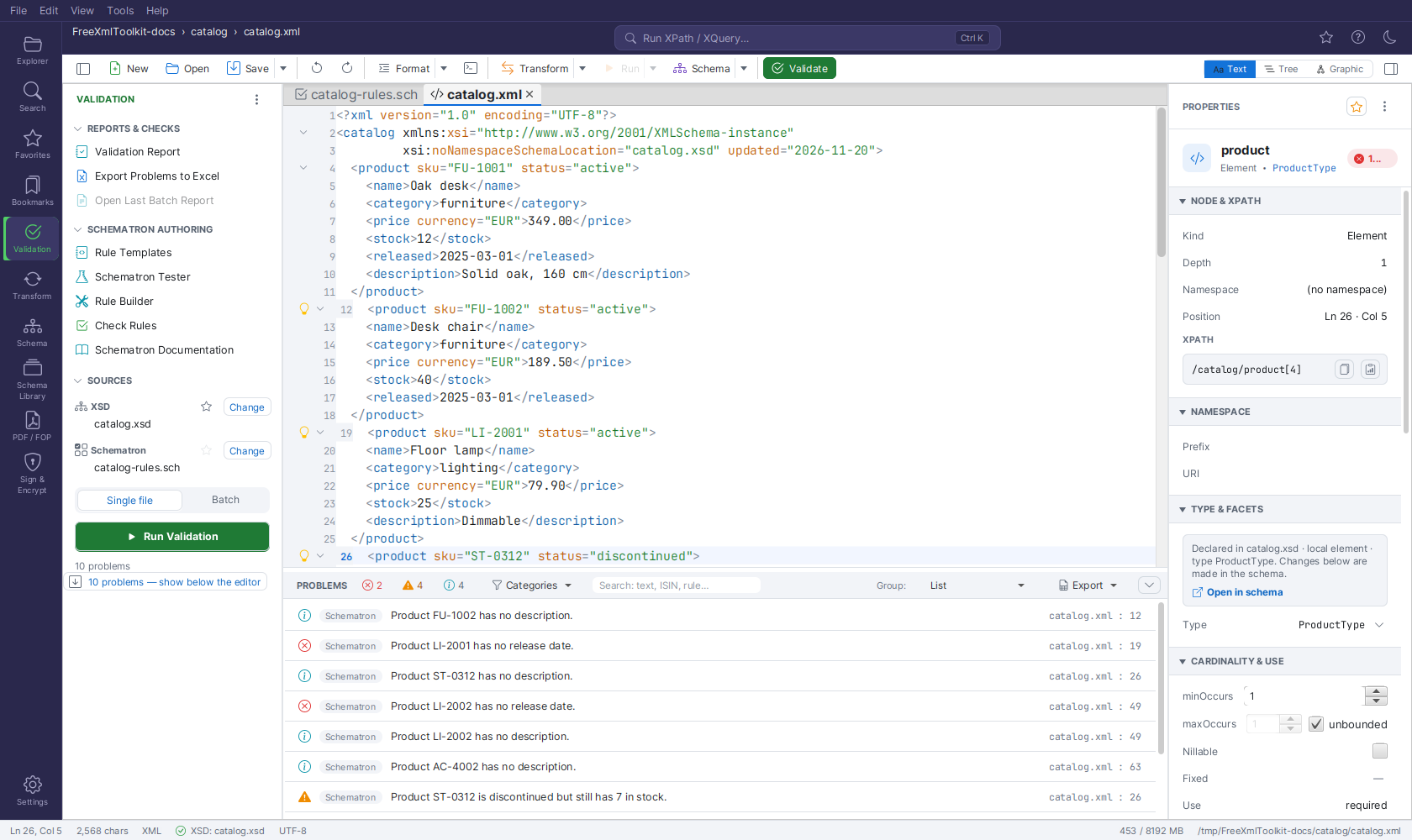 Schematron results below the document: errors, warnings and hints, each with the line it belongs to
The Validation activity panel offers the Schematron tools as labelled rows in two collapsible sections at the top of the panel (both open at first - click a header to collapse it). Each tool opens as a closable tool tab in the editor area:
| Tool | Section | What It Does |
|---|---|---|
| Rule Templates | SCHEMATRON AUTHORING | Insert ready-made Schematron rule patterns into the active editor |
| Schematron Tester | SCHEMATRON AUTHORING | Run the rules against an XML file (pre-loads the bound Schematron, if any) |
| Rule Builder | SCHEMATRON AUTHORING | Build rules visually |
| Check Rules | SCHEMATRON AUTHORING | Inspect the Schematron file itself for problems |
| Schematron Documentation | SCHEMATRON AUTHORING | Generate documentation for the Schematron file |
| Validation Report | REPORTS & CHECKS | Open a detailed report of the last Schematron validation run |
Check Rules
Check Rules runs an error detector over your Schematron file and shows the issues it finds in a categorised table, so you can fix mistakes in the rules before relying on them. Issues are grouped into categories:
| Category | Examples |
|---|---|
| XML syntax | Malformed XML, unclosed tags |
| Structural | Missing or misplaced patterns, rules, or assertions |
| XPath | Invalid XPath expressions in contexts or tests |
| Semantic | Rules that can never match, or contradictory conditions |
| Best practice | Style and maintainability suggestions |
Documentation
Schematron Documentation opens the Schematron documentation generator, which produces readable documentation describing the patterns, rules, and assertions in your Schematron file.
Validation Report
After validating an XML document that has a Schematron file bound, Validation Report (a row in the Validation panel's REPORTS & CHECKS section) opens a Schematron Report tool tab. It shows the document name, the Schematron file, an error/warning summary, and a table with one row per finding - severity, line, message, the failed rule/test expression, and the failing node's XPath context. Clicking a row jumps to that line in the editor.
The report can be exported with Save Report (HTML) (a self-contained HTML file) or Save SVRL (XML) (the raw SVRL result of the run). See Detailed Schematron Report in the Unified Shell guide.
Creating Schematron Rules
Basic Structure
<?xml version="1.0" encoding="UTF-8"?>
<schema xmlns="http://purl.oclc.org/dsdl/schematron">
    <title>My Validation Rules</title>

    <pattern name="Invoice Validation">
        <rule context="invoice">
            <assert test="@date">
                Every invoice must have a date attribute.
            </assert>
            <assert test="customer">
                Every invoice must have a customer element.
            </assert>
        </rule>
    </pattern>
</schema>
Common Rule Patterns
Required Field
Conditional Requirement
<rule context="order">
    <assert test="not(@status='shipped') or shipDate">
        Shipped orders must have a ship date.
    </assert>
</rule>
Value Comparison
<rule context="order">
    <assert test="endDate >= startDate">
        End date must be after start date.
    </assert>
</rule>
Sum Validation
<rule context="invoice">
    <assert test="sum(item/price) = total">
        Total must equal sum of item prices.
    </assert>
</rule>
Unique Values
<rule context="items">
    <assert test="count(item) = count(distinct-values(item/@id))">
        All item IDs must be unique.
    </assert>
</rule>
Cross-Reference
<rule context="orderLine">
    <assert test="@productId = //product/@id">
        Product ID must reference an existing product.
    </assert>
</rule>
Testing Rules
Test Against XML Files
- Open the Validation activity and click Schematron Tester in the SCHEMATRON AUTHORING section
- Pick the Schematron file with Browse… (the one bound to the active document is pre-loaded) and add the XML file(s) to test with Add XML Files
- Click Run Tests and review the results in the Tester tab
For a quick check of many files at once, select the XML files in the Explorer's workspace tree, right-click and choose Validate with <Schematron> - it validates them against the last-used Schematron.
Integration with XML Editor
Use Schematron validation directly in the XML Editor:
- Open an XML file in the editor
- In the Validation panel's SOURCES section, click the Schematron row to select
your Schematron file (or pick one from its favorites menu) - or simply drop a
.sch/.schematronfile from your file manager onto that row - Press Validate (F8) or click Run Validation in the panel; with Validate while typing on, the document is re-checked as you edit
- Errors are highlighted in the editor; click a problem to jump to its location
In the PROBLEMS panel below the editor, Schematron findings carry a Schematron source badge (so they are easy to tell apart from XSD errors), and hovering a row shows the full message together with the failed test expression and the failing node's XPath. For a complete overview of a run, open the Validation Report.
If a rule defines Schematron Quick Fixes (SQF), the matching problems can be corrected automatically — from a right-click Quick Fix menu on the problem rows, from a lightbulb in the editor gutter, or from the Validation Report's Fix column. See Schematron Quick Fixes for the full guide, including how to author fixes.
Favorites Integration
Save frequently used Schematron files for quick access:
- Add Favorite (Ctrl+D) - Save current file to favorites
- Favorites (Ctrl+Shift+D) - Show/hide the favorites panel
XPath Reference
Common XPath expressions for Schematron rules:
| Expression | Description |
|---|---|
. |
Current node |
@attribute |
Attribute of current node |
child::element |
Child element |
parent::element |
Parent element |
//element |
Any element in document |
count(element) |
Count elements |
string-length(.) |
Length of text content |
contains(., 'text') |
Text contains substring |
starts-with(., 'text') |
Text starts with |
normalize-space(.) |
Normalized whitespace |
sum(element) |
Sum of numeric values |
distinct-values(element) |
Unique values |
Supported Formats
| Format | Support |
|---|---|
| ISO Schematron (.sch) | Full support |
| XSLT-based Schematron | Full support |
Note
Schematron validation runs on the SchXslt
compiler (executed by Saxon), which fully resolves sch:include,
sch:extends, and abstract patterns. Schematrons that declare
queryBinding="xslt2" or "xslt3" use XPath 2.0/3.0; files without a
queryBinding attribute are compiled as xslt2, so existing rule files keep
working unchanged.
Keyboard Shortcuts
| Shortcut | Action |
|---|---|
| Ctrl+N | New file (Schematron template available) |
| Ctrl+S | Save file |
| Ctrl+Shift+S | Save As |
| F8 | Validate the active document |
| Ctrl+Shift+X | Toggle the Query Console (XPath/XQuery) |
| Alt+Enter / Ctrl+. | Open the Quick Fix chooser on the current line |
| Ctrl+D | Add to favorites |
| Ctrl+Shift+D | Toggle favorites |
Tips
- Start simple - Begin with basic rules and add complexity
- Test both ways - Test with valid and invalid sample files
- Clear messages - Write helpful error messages for users
- Use patterns - Group related rules into patterns
- Query Console - Press Ctrl+Shift+X to test XPath expressions against the open document before using them in a rule
Troubleshooting
| Problem | Solution |
|---|---|
| Rule not firing | Check the context XPath matches elements |
| False positives | Review your test condition logic |
| Namespace issues | Add namespace declarations to schema |
| Performance slow | Optimize complex XPath expressions |
Testing Schematron with XSpec
Schematron rules can be unit-tested with XSpec (x:expect-assert, x:expect-report, x:expect-valid): see
Testing with XSpec.
Next steps
- Schematron Quick Fixes
- Debugger - step through a Schematron
- Test with XSpec