XSLT Developer
Last Updated: December 2025 | Version: 1.1.0
The XSLT Developer is a full-featured development environment for creating and testing XSLT stylesheets and XQuery scripts. It includes live transformation, parameter support, batch processing, and debugging tools.
Overview
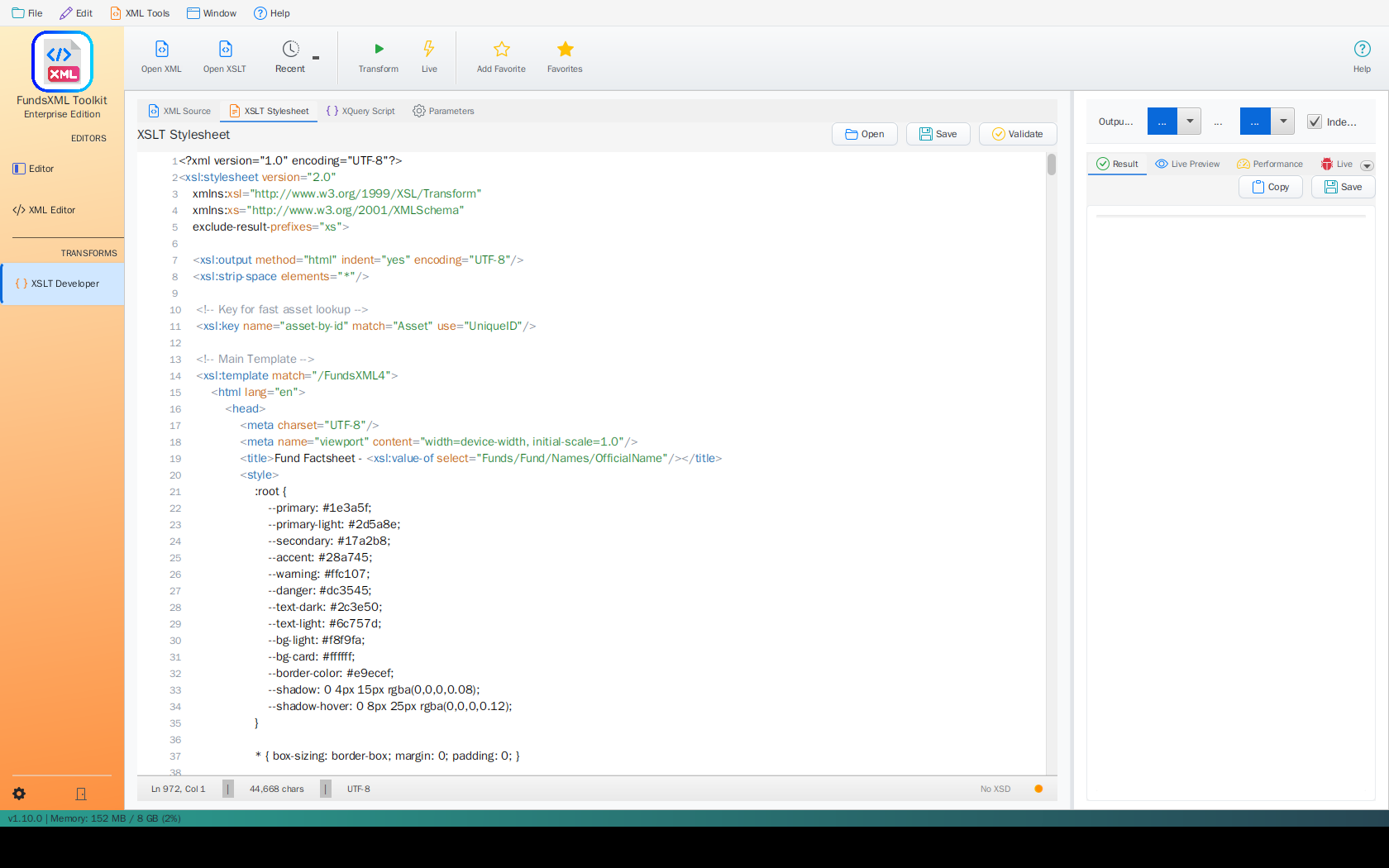 The XSLT Developer with editors, parameters, and result panels
The XSLT Developer provides:
- Full code editors for XML, XSLT, and XQuery
- Live Transform mode for instant feedback
- XSLT Parameters for reusable stylesheets
- Multi-file batch processing using XQuery
- Performance metrics and debugging
- Favorites integration for quick access
Interface Layout
Left Panel: Input Editors
The left panel contains tabbed editors for your source files:
| Tab | Description |
|---|---|
| XML Source | The XML document to transform |
| XSLT Stylesheet | Your XSLT transformation code |
| XQuery Script | XQuery code for queries and transformations |
| Parameters | Define parameters to pass to XSLT |
Right Panel: Results
| Tab | Description |
|---|---|
| Result | The transformation output |
| Live Preview | Real-time HTML rendering |
| Performance | Execution metrics and statistics |
| Debug | Messages, warnings, and execution trace |
Toolbar
| Button | Shortcut | Description |
|---|---|---|
| Open XML | - | Load an XML source file |
| Transform | F5 or Ctrl+R | Execute the transformation |
| Live | Ctrl+L | Toggle live transform mode |
| Add Favorite | Ctrl+D | Save current file to favorites |
| Favorites | Ctrl+Shift+D | Show/hide favorites panel |
| Help | F1 | Open help |
Getting Started
Step 1: Load Your Files
- Click Open XML in the toolbar to load your source XML
- Switch to the XSLT Stylesheet tab
- Click Open to load an XSLT file, or type directly in the editor
Step 2: Transform
Click Transform (or press F5) to run the transformation.
Step 3: View Results
The output appears in the Result tab. For HTML output, switch to Live Preview to see the rendered page.
Live Transform Mode
Enable Live Transform to automatically re-run the transformation whenever you make changes to the XML, XSLT, or XQuery.
- Click the Live button in the toolbar (or press Ctrl+L)
- The button highlights when live mode is active
- Make changes to any input - results update automatically
This is ideal for developing and debugging stylesheets.
Using XSLT Parameters
XSLT stylesheets can accept parameters to make them more flexible. The Parameters tab lets you define these values.
Defining Parameters in XSLT
<?xml version="1.0" encoding="UTF-8"?>
<xsl:stylesheet version="1.0"
                xmlns:xsl="http://www.w3.org/1999/XSL/Transform">

  <!-- Define a parameter with a default value -->
  <xsl:param name="title" select="'Default Title'"/>
  <xsl:param name="show-prices" select="true()"/>
  <xsl:param name="currency" select="'EUR'"/>

  <xsl:template match="/">
    <html>
      <head><title><xsl:value-of select="$title"/></title></head>
      <body>
        <h1><xsl:value-of select="$title"/></h1>
        <xsl:if test="$show-prices">
          <!-- Show prices in the specified currency -->
        </xsl:if>
      </body>
    </html>
  </xsl:template>

</xsl:stylesheet>
Setting Parameter Values
- Switch to the Parameters tab
- Click Add to create a new parameter
- Enter the parameter name (e.g.,
title) - Enter the value (e.g.,
My Custom Report) - Select the type: String, Number, or Boolean
Parameters are passed to the XSLT processor during transformation.
XQuery Development
The XQuery Script tab provides a full XQuery editor. XQuery is powerful for querying and transforming XML data.
Basic XQuery Example
for $book in /books/book
where $book/price > 30
order by $book/title
return <result>{$book/title}</result>
Built-in XQuery Examples
Click the Examples button to insert sample queries:
| Example | Description |
|---|---|
| Simple Query | Basic element selection |
| FLWOR Expression | For-Let-Where-Order-Return |
| HTML Report | Generate HTML output |
| Data Quality Check | Validate data completeness |
Multi-File Batch Processing
Process multiple XML files at once using XQuery and the collection() function.
Switching to Batch Mode
- In the XML Source tab, select Multiple Files (Batch)
- The interface changes to show a file list
Adding Files
| Action | Description |
|---|---|
| Add Files | Select individual XML files |
| Add Directory | Add all XML files from a folder |
| Remove Selected | Remove checked files from the list |
| Clear All | Remove all files |
| Select All | Check/uncheck all files |
Writing XQuery for Batch Processing
Use collection() to access all selected files:
Example 1: List All Root Elements
Example 2: Extract Data from All Files
for $doc in collection()
for $order in $doc//order
return <result>
  <file>{document-uri($doc)}</file>
  <orderId>{$order/@id/string()}</orderId>
  <total>{$order/total/string()}</total>
</result>
Example 3: Count Elements Across Files
<summary>
  <totalFiles>{count(collection())}</totalFiles>
  <totalOrders>{count(collection()//order)}</totalOrders>
</summary>
Example 4: Find Files with Specific Content
Example 5: Aggregate Data
<report>
  <totalAmount>{sum(collection()//amount)}</totalAmount>
  <averageValue>{avg(collection()//value)}</averageValue>
  <fileCount>{count(collection())}</fileCount>
</report>
Viewing Batch Results
After processing, choose how to view results:
| Mode | Description |
|---|---|
| Combined | All results merged together |
| Per File | Select individual file results from dropdown |
Saving Batch Results
- Save - Save the combined output as a single file
- Save All - Save each file's result separately with
_resultsuffix
XSLT 3.0 Examples
FreeXmlToolkit supports XSLT 3.0 via Saxon HE. Here are some advanced patterns:
For-Each-Group (XSLT 2.0/3.0)
Group items without the Muenchian method:
<?xml version="1.0" encoding="UTF-8"?>
<xsl:stylesheet version="3.0"
                xmlns:xsl="http://www.w3.org/1999/XSL/Transform">

  <xsl:output method="html" indent="yes"/>

  <xsl:template match="/">
    <html>
      <body>
        <h1>Books by Author</h1>
        <xsl:for-each-group select="books/book" group-by="author">
          <xsl:sort select="current-grouping-key()"/>
          <h2><xsl:value-of select="current-grouping-key()"/></h2>
          <ul>
            <xsl:for-each select="current-group()">
              <li><xsl:value-of select="title"/></li>
            </xsl:for-each>
          </ul>
        </xsl:for-each-group>
      </body>
    </html>
  </xsl:template>

</xsl:stylesheet>
Using Maps and Arrays (XSLT 3.0)
<?xml version="1.0" encoding="UTF-8"?>
<xsl:stylesheet version="3.0"
                xmlns:xsl="http://www.w3.org/1999/XSL/Transform"
                xmlns:map="http://www.w3.org/2005/xpath-functions/map">

  <xsl:output method="text"/>

  <xsl:variable name="config" select="map {
    'title': 'Report',
    'format': 'detailed',
    'max-items': 100
  }"/>

  <xsl:template match="/">
    <xsl:text>Title: </xsl:text>
    <xsl:value-of select="map:get($config, 'title')"/>
  </xsl:template>

</xsl:stylesheet>
JSON Output (XSLT 3.0)
<?xml version="1.0" encoding="UTF-8"?>
<xsl:stylesheet version="3.0"
                xmlns:xsl="http://www.w3.org/1999/XSL/Transform">

  <xsl:output method="json" indent="yes"/>

  <xsl:template match="/">
    <xsl:map>
      <xsl:map-entry key="'books'">
        <xsl:array>
          <xsl:for-each select="books/book">
            <xsl:map>
              <xsl:map-entry key="'title'" select="string(title)"/>
              <xsl:map-entry key="'author'" select="string(author)"/>
              <xsl:map-entry key="'price'" select="number(price)"/>
            </xsl:map>
          </xsl:for-each>
        </xsl:array>
      </xsl:map-entry>
    </xsl:map>
  </xsl:template>

</xsl:stylesheet>
Text Value Templates (XSLT 3.0)
<?xml version="1.0" encoding="UTF-8"?>
<xsl:stylesheet version="3.0"
                xmlns:xsl="http://www.w3.org/1999/XSL/Transform"
                expand-text="yes">

  <xsl:output method="html" indent="yes"/>

  <xsl:template match="/">
    <html>
      <body>
        <xsl:for-each select="books/book">
          <p>{title} by {author} - ${price}</p>
        </xsl:for-each>
      </body>
    </html>
  </xsl:template>

</xsl:stylesheet>
Performance Tab
Monitor transformation performance:
| Metric | Description |
|---|---|
| Execution Time | Total transformation time in milliseconds |
| Compilation Time | Time to compile the XSLT stylesheet |
| Memory Usage | Memory consumed during transformation |
| Output Size | Size of the generated output |
The XSLT Features Used list shows which XSLT features were detected in your stylesheet.
Debug Tab
Use debugging features to troubleshoot transformations:
Messages & Warnings
Shows all <xsl:message> output and Saxon warnings.
Template Execution Trace
Enable Debug Mode to see the sequence of template calls.
Tips for Debugging
- Use
<xsl:message>to output debug information - Check the Debug tab for warnings about unused variables or templates
- Enable Debug Mode for detailed execution trace
- Click Clear to reset the debug output
Output Options
Configure the transformation output:
| Option | Values | Description |
|---|---|---|
| Output Format | XML, HTML, Text, JSON | The expected output format |
| Encoding | UTF-8, ISO-8859-1, etc. | Character encoding for output |
| Indent Output | On/Off | Pretty-print the output |
Keyboard Shortcuts
| Shortcut | Action |
|---|---|
| F5 | Execute transformation |
| Ctrl+R | Execute transformation |
| Ctrl+L | Toggle live transform |
| Ctrl+D | Add to favorites |
| Ctrl+Shift+D | Show/hide favorites |
| Ctrl+Shift+C | Copy result |
| Ctrl+Alt+S | Save result |
| F1 | Help |
XQuery Examples
Data Extraction
(: Extract all customer emails :)
for $customer in /customers/customer
return <email>{$customer/email/text()}</email>
Transformation
(: Transform to HTML table :)
<table>
  <tr><th>Name</th><th>Email</th></tr>
  {
    for $c in /customers/customer
    return <tr>
      <td>{$c/name/text()}</td>
      <td>{$c/email/text()}</td>
    </tr>
  }
</table>
Aggregation
(: Calculate statistics :)
let $orders := /orders/order
return <stats>
  <count>{count($orders)}</count>
  <total>{sum($orders/amount)}</total>
  <average>{avg($orders/amount)}</average>
  <min>{min($orders/amount)}</min>
  <max>{max($orders/amount)}</max>
</stats>
Conditional Logic
(: Categorize items :)
for $item in /items/item
return <categorized>
  <name>{$item/name/text()}</name>
  <category>{
    if ($item/price > 100) then "Premium"
    else if ($item/price > 50) then "Standard"
    else "Budget"
  }</category>
</categorized>
Tips
- Start with Live Mode off for large files to avoid slow updates
- Use the Examples menu to insert working XQuery templates
- Check Performance tab if transformations are slow
- Save your work to favorites for quick access later
- Use batch mode for processing multiple files efficiently
- Enable Debug Mode when troubleshooting complex stylesheets
- Only process trusted stylesheets - see Security Features for details on XSLT extension security
Troubleshooting
| Problem | Solution |
|---|---|
| No output | Check that XML and XSLT/XQuery are both loaded |
| Syntax error | Check the Debug tab for error details |
| Slow transformation | Check Performance tab; consider simplifying |
| Batch results empty | Ensure files are selected (checkboxes checked) |
| Parameters not working | Verify parameter names match exactly |
| Java extension function not found | Java extensions are disabled by default for security. See Security Features |
Navigation
| Previous | Home | Next |
|---|---|---|
| XSLT Viewer | Home | PDF Generator (FOP) |
All Pages: XML Editor | XML Features | XSD Tools | XSD Validation | XSLT Viewer | XSLT Developer | FOP/PDF | Signatures | IntelliSense | Schematron | Favorites | Templates | Tech Stack | Security | Licenses